
this layout didn't match....
- Carel Steijn
- Offline
- New Member
-

Less
More
- Posts: 6
16 Jan 2017 14:00 #3685
by Carel Steijn
Replied by Carel Steijn on topic this layout didn't match....
I deleted the text in the language file.
Regards
C.Steijn
Regards
C.Steijn
Please Log in to join the conversation.
- Carel Steijn
- Offline
- New Member
-
Less
More
- Posts: 6
09 Jan 2017 08:08 #3622
by Carel Steijn
Replied by Carel Steijn on topic this layout didn't match....
I know that option and the switch has been set to off all the time.
Still the mismatch message is displayed on all pages but the homepage.
Regards
C.Steijn
Still the mismatch message is displayed on all pages but the homepage.
Regards
C.Steijn
Please Log in to join the conversation.
- Daniel
- Offline
- Administrator
-

08 Jan 2017 15:09 #3620
by Daniel
Thanks
Daniel
Replied by Daniel on topic this layout didn't match....
There is an option in module parameters in backend itself to hide this message,
Thanks
Daniel
Please Log in to join the conversation.
- Carel Steijn
- Offline
- New Member
-
Less
More
- Posts: 6
08 Jan 2017 08:45 #3619
by Carel Steijn
Replied by Carel Steijn on topic this layout didn't match....
Hi Daniel
I followed your advise and now the reviews are displayed on a page with menu-item setting single article.
Only one problem remains: the mismatch message.
"Deze layout komt niet overeen met de layout in het geselecteerde profiel."
I might solve his by clearing this message in the language file? (workaround)
Thanks
Carel Steijn
I followed your advise and now the reviews are displayed on a page with menu-item setting single article.
Only one problem remains: the mismatch message.
"Deze layout komt niet overeen met de layout in het geselecteerde profiel."
I might solve his by clearing this message in the language file? (workaround)
Thanks
Carel Steijn
Please Log in to join the conversation.
- Daniel
- Offline
- Administrator
-
07 Jan 2017 12:04 #3611
by Daniel
Thanks
Daniel
Replied by Daniel on topic this layout didn't match....
You need to choose single Article layout in vReview profile and same "Single Article" layout when you create the Review menu.
Thanks
Daniel
Please Log in to join the conversation.
- Carel Steijn
- Offline
- New Member
-
Less
More
- Posts: 6
07 Jan 2017 11:59 #3610
by Carel Steijn
Replied by Carel Steijn on topic this layout didn't match....
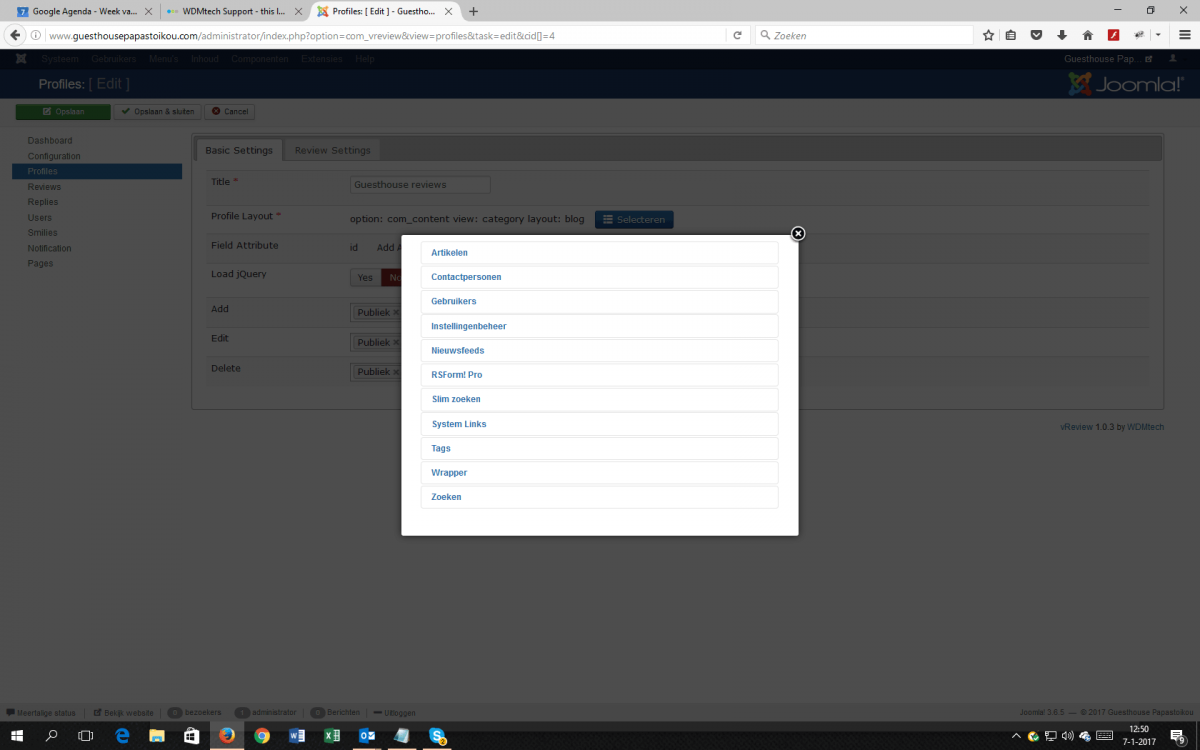
Which selection (see attachment) do I have to make if I want to display the review module on a empty article page(Article is empty and review module is in position-3)
Can you do that for me?
I still don't understand why the mismatch mesaage ("Deze layout komt niet overeen met de layout in het geselecteerde profiel.") is displayed on all pages because the module settings are "don not display in all menu-items except home".
Regards
C.Steijn
Can you do that for me?
I still don't understand why the mismatch mesaage ("Deze layout komt niet overeen met de layout in het geselecteerde profiel.") is displayed on all pages because the module settings are "don not display in all menu-items except home".
Regards
C.Steijn
Please Log in to join the conversation.
- Daniel
- Offline
- Administrator
-
07 Jan 2017 09:36 #3609
by Daniel
Thanks
Daniel
Replied by Daniel on topic this layout didn't match....
Hello,
I've already explained you can display the review module only on the same layout which is chosen in review profile. Layout chosen in review profile and on homepage Menu is same that's why It's displaying there not on all other pages.
I've already explained you can display the review module only on the same layout which is chosen in review profile. Layout chosen in review profile and on homepage Menu is same that's why It's displaying there not on all other pages.
Thanks
Daniel
Please Log in to join the conversation.
- Carel Steijn
- Offline
- New Member
-
Less
More
- Posts: 6
07 Jan 2017 09:26 #3608
by Carel Steijn
Replied by Carel Steijn on topic this layout didn't match....
I checked and saw that Review form and review list are already there on the homepage.
This is exactly what I would like to see that too when using a Reviews menu-item.
How did yo get it on the homepage?
I disabled menu item “reviews” to test
Still I see that the layout mismatch message appears on all pages but homepage!
Regards
C.Steijn
" Review form and review list is already there on homepage and review page. Please check. But if you want to have a separate section where you can display all the reviews then there is no such section in vReview. You can display the reviews on the same page for which these reviews were submitted e.g. You got reviews on an Article page / Blog page then that’s the only place where reviews posted on that Article / Blog can be displayed."
This is exactly what I would like to see that too when using a Reviews menu-item.
How did yo get it on the homepage?
I disabled menu item “reviews” to test
Still I see that the layout mismatch message appears on all pages but homepage!
Regards
C.Steijn
" Review form and review list is already there on homepage and review page. Please check. But if you want to have a separate section where you can display all the reviews then there is no such section in vReview. You can display the reviews on the same page for which these reviews were submitted e.g. You got reviews on an Article page / Blog page then that’s the only place where reviews posted on that Article / Blog can be displayed."
Please Log in to join the conversation.
- Daniel
- Offline
- Administrator
-
19 Dec 2016 10:29 #3523
by Daniel
Thanks
Daniel
Replied by Daniel on topic this layout didn't match....
Hello,
Please make sure you are using the same layout to publish the module which was chosen in the profile settings.
Please make sure you are using the same layout to publish the module which was chosen in the profile settings.
Thanks
Daniel
Please Log in to join the conversation.
- Carel Steijn
- Offline
- New Member
-
Less
More
- Posts: 6
19 Dec 2016 09:51 #3522
by Carel Steijn
Replied by Carel Steijn on topic this layout didn't match....
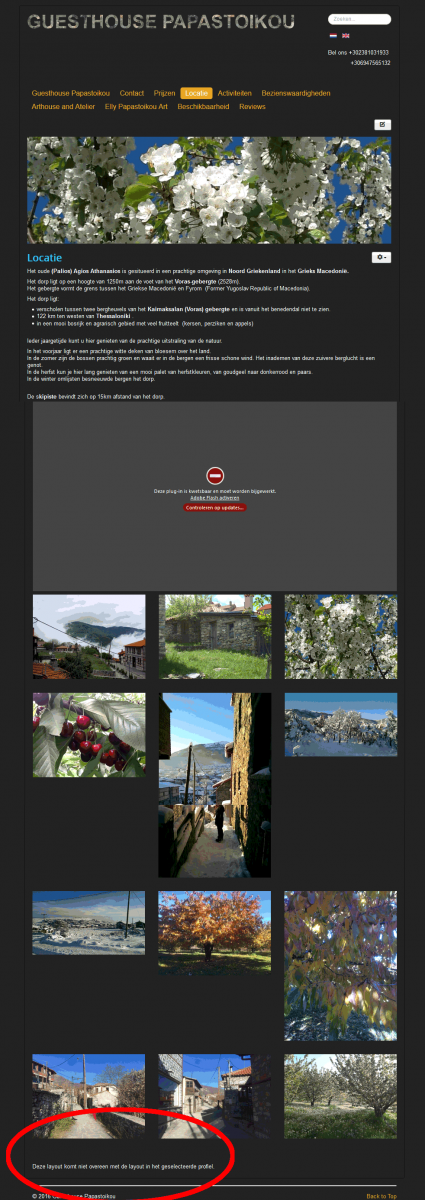
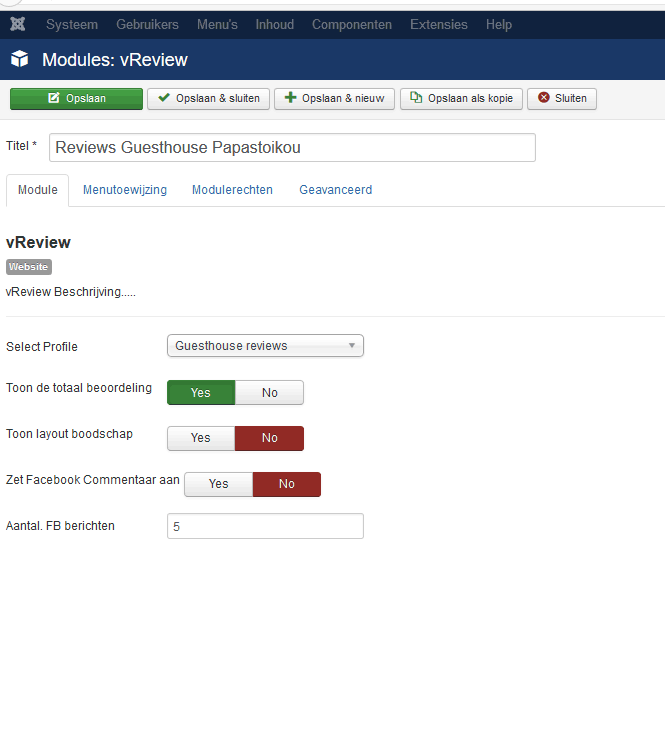
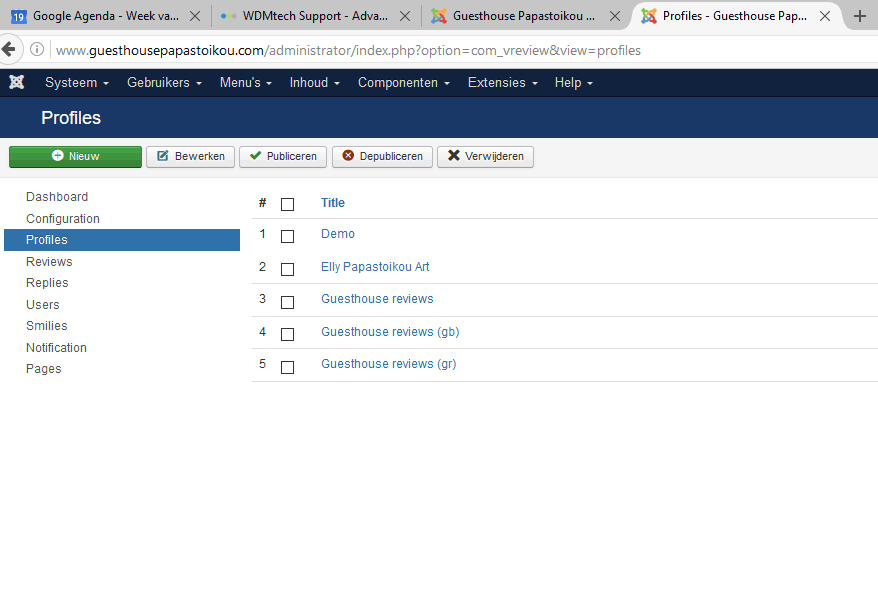
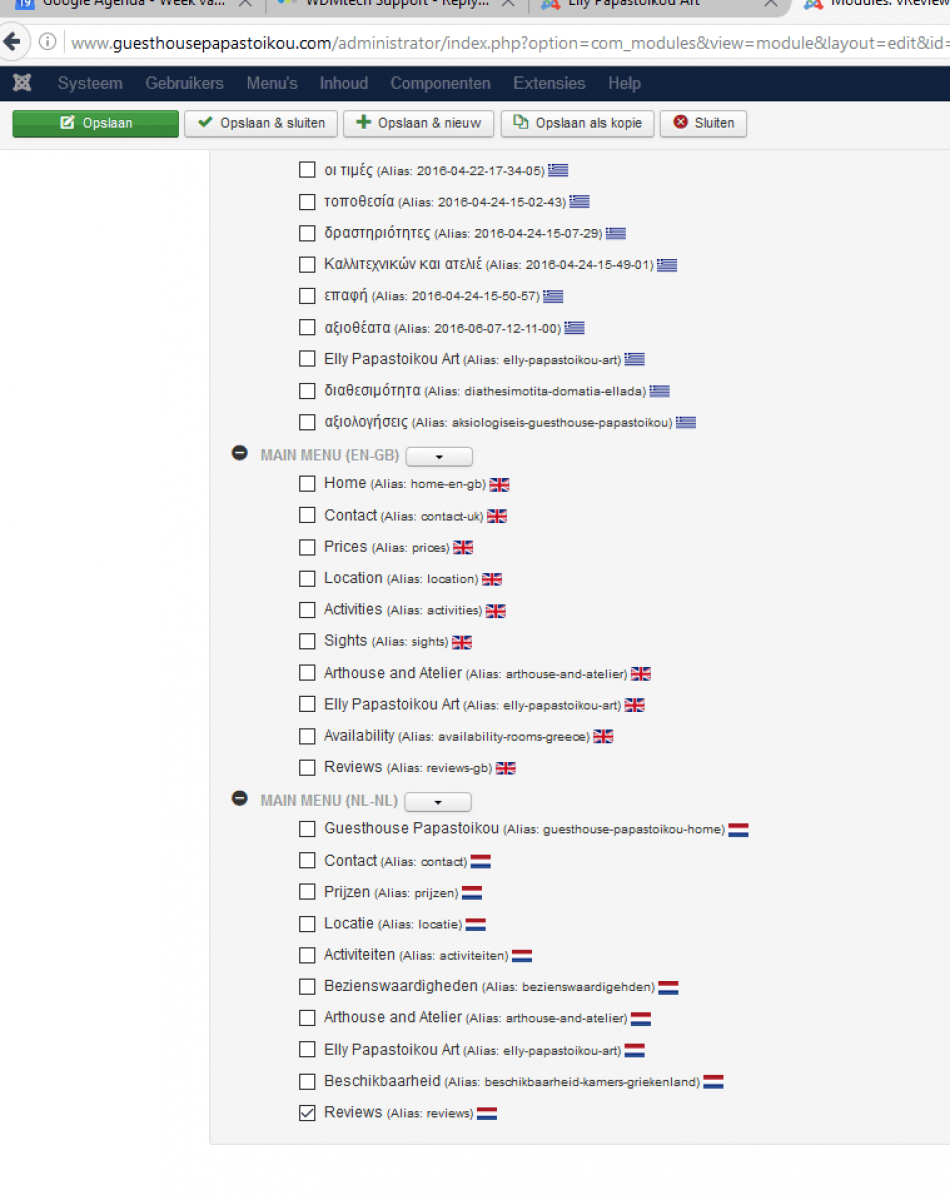
Om my site guesthousepapastoikou.com I have the same message on every page "this layout didn't match the layout selected"
I followed your instructions but still no result.
See attachments
Have I forgotten something?
Regards
C.Steijn Cast-Art
I followed your instructions but still no result.
See attachments
Have I forgotten something?
Regards
C.Steijn Cast-Art
Please Log in to join the conversation.
- Daniel
- Offline
- Administrator
-
05 Oct 2016 14:58 #3196
by Daniel
Thanks
Daniel
Replied by Daniel on topic this layout didn't match....
Hi,
There is an option in module parameters in backend to either use Facebook comments or use vReview, You have chosen Facebook over vReview. Please correct that.
There is an option in module parameters in backend to either use Facebook comments or use vReview, You have chosen Facebook over vReview. Please correct that.
Thanks
Daniel
Please Log in to join the conversation.
- Alessandro
- Topic Author
- Offline
- New Member
-
Less
More
- Posts: 2
03 Oct 2016 09:42 #3190
by Alessandro
Replied by Alessandro on topic this layout didn't match....
Hi,
now seems to work, but i can see only a facebook plugin with comments, i can't see stars and else.
Then i would that a user can comment by his/her username, not by facebook.
Thanks
now seems to work, but i can see only a facebook plugin with comments, i can't see stars and else.
Then i would that a user can comment by his/her username, not by facebook.
Thanks
Please Log in to join the conversation.
- Daniel
- Offline
- Administrator
-
03 Oct 2016 06:44 #3187
by Daniel
Thanks
Daniel
Replied by Daniel on topic this layout didn't match....
Hi,
Here are a few quick steps:
1. The most important parameter while creating a profile is "Profile Layout". Profile layout is the layout where you want to display the review form or the Item on which you want to receive the reviews in Front end.
2. In profile add/edit view Click on Select button to choose the layout from all available options. It's very much similar to selecting the layout when you create a Menu in Joomla.
3. Save the Profile after making all the required changes in settings as per your need.
4. Go to module manager, Create a new module for vReview and publish this module on the same Menu wherever you want to publish it. The layout chosen on this particular Menu should be the same what you chose in vReview Profile.
5. You are done.
Here are a few quick steps:
1. The most important parameter while creating a profile is "Profile Layout". Profile layout is the layout where you want to display the review form or the Item on which you want to receive the reviews in Front end.
2. In profile add/edit view Click on Select button to choose the layout from all available options. It's very much similar to selecting the layout when you create a Menu in Joomla.
3. Save the Profile after making all the required changes in settings as per your need.
4. Go to module manager, Create a new module for vReview and publish this module on the same Menu wherever you want to publish it. The layout chosen on this particular Menu should be the same what you chose in vReview Profile.
5. You are done.
Thanks
Daniel
Please Log in to join the conversation.
- Alessandro
- Topic Author
- Offline
- New Member
-
Less
More
- Posts: 2
02 Oct 2016 13:56 #3186
by Alessandro
this layout didn't match.... was created by Alessandro
Hi
I've just bought vreview, i've followed all the steps from the documentation but i still can't use it.
It gives me an error "this layout didn't match the layuot selected".
Maybe if i explain my work plan you can solve this problem.
I'm working on a kind of yellow pages, for find workers all around italy.
Everyone has his own area.
Now in this area i need to put vreview.
Here i have already one problem. Even if it just writes me "this layout....." it deletes an image slideshow.
Well, i can afford this by creating a new page, that i can link to a worker page.
I created a new page, but it still doesn't work.
Maybe i just miss something.
Anyway would be nice a day to have a video on you tube on how it should be used.
If you need i can let you use my ftp and give a look.
Thanks.
I've just bought vreview, i've followed all the steps from the documentation but i still can't use it.
It gives me an error "this layout didn't match the layuot selected".
Maybe if i explain my work plan you can solve this problem.
I'm working on a kind of yellow pages, for find workers all around italy.
Everyone has his own area.
Now in this area i need to put vreview.
Here i have already one problem. Even if it just writes me "this layout....." it deletes an image slideshow.
Well, i can afford this by creating a new page, that i can link to a worker page.
I created a new page, but it still doesn't work.
Maybe i just miss something.
Anyway would be nice a day to have a video on you tube on how it should be used.
If you need i can let you use my ftp and give a look.
Thanks.
Please Log in to join the conversation.