
Marker out of range/bad position
- Infosistems Labs
- Offline
- New Member
-

Less
More
- Posts: 5
31 May 2018 17:04 #6030
by Infosistems Labs
Replied by Infosistems Labs on topic Marker out of range/bad position
Hello Daniel
Perfect!, all is now OK!.
Thanks to solve it.!
Perfect!, all is now OK!.
Thanks to solve it.!
Please Log in to join the conversation.
- Daniel
- Offline
- Administrator
-

31 May 2018 10:59 #6029
by Daniel
Thanks
Daniel
Replied by Daniel on topic Marker out of range/bad position
Hello,
It seems the marker height & width entered in Map settings doesn't match the actual marker image size. Please check it correct accordingly. The marker image you are using is 32*32. Please change it in Map settings.
It seems the marker height & width entered in Map settings doesn't match the actual marker image size. Please check it correct accordingly. The marker image you are using is 32*32. Please change it in Map settings.
Thanks
Daniel
Please Log in to join the conversation.
- Infosistems Labs
- Offline
- New Member
-
Less
More
- Posts: 5
30 May 2018 12:03 #6028
by Infosistems Labs
Replied by Infosistems Labs on topic Marker out of range/bad position
Hello Daniel
I updated the module, but the error at display the marker continues. Now the marker is show upper the real possition.
Best regards
Enrique
I updated the module, but the error at display the marker continues. Now the marker is show upper the real possition.
Best regards
Enrique
Please Log in to join the conversation.
- Daniel
- Offline
- Administrator
-
30 May 2018 11:00 #6023
by Daniel
Thanks
Daniel
Replied by Daniel on topic Marker out of range/bad position
Hello,
Please download the latest version i.e. 1.9.6.
Please download the latest version i.e. 1.9.6.
Thanks
Daniel
Please Log in to join the conversation.
- I Labs
- Topic Author
- Offline
- New Member
-
Less
More
- Posts: 6
29 May 2018 07:28 #6021
by I Labs
Replied by I Labs on topic Marker out of range/bad position
Hello Daniel
I have vMap 1.9.4
A sample is:
And teh result;
Is the same with other places
Thanks
Enrique
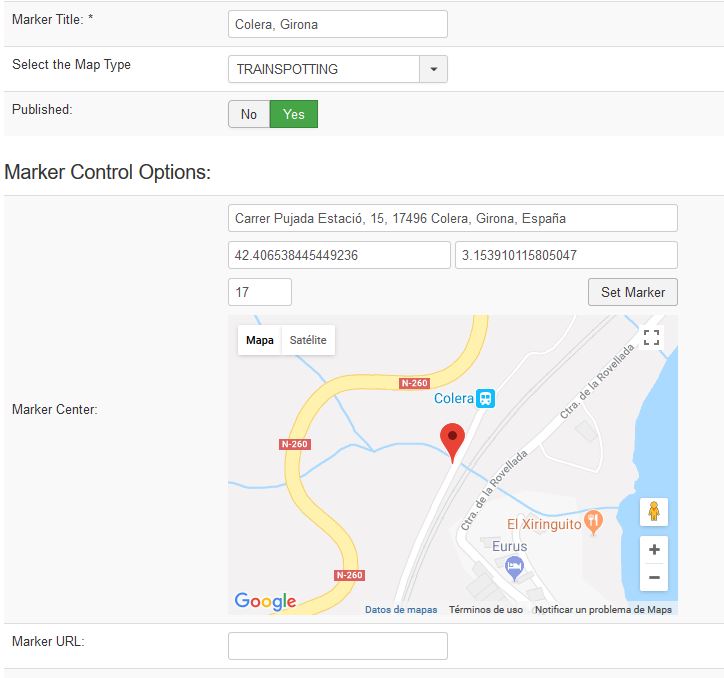
I have vMap 1.9.4
A sample is:
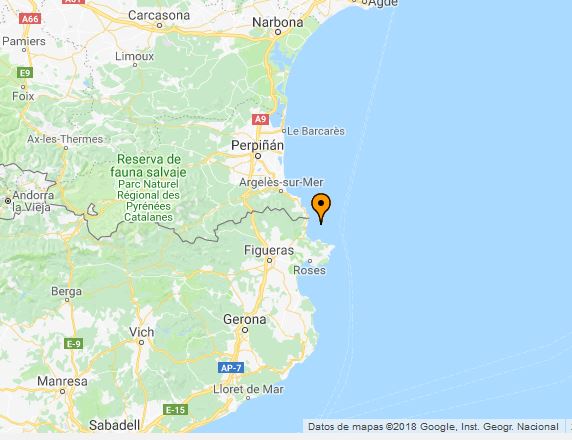
And teh result;
Is the same with other places
Thanks
Enrique
Please Log in to join the conversation.
- Daniel
- Offline
- Administrator
-
29 May 2018 05:27 #6020
by Daniel
Thanks
Daniel
Replied by Daniel on topic Marker out of range/bad position
Hello,
Please update to the latest version if It's not already. And If you already have the latest version, please share the marker edit page screenshot which is going out of position.
Please update to the latest version if It's not already. And If you already have the latest version, please share the marker edit page screenshot which is going out of position.
Thanks
Daniel
Please Log in to join the conversation.
- I Labs
- Topic Author
- Offline
- New Member
-
Less
More
- Posts: 6
28 May 2018 09:36 #6017
by I Labs
Replied by I Labs on topic Marker out of range/bad position
Hello Daniel
India now is activated, try again, please
India now is activated, try again, please
Please Log in to join the conversation.
- Daniel
- Offline
- Administrator
-
- I Labs
- Topic Author
- Offline
- New Member
-
Less
More
- Posts: 6
28 May 2018 08:43 #6015
by I Labs
Replied by I Labs on topic Marker out of range/bad position
Sorry
We have a Firewall intalled.
Witch is your country for make acess.?
We have a Firewall intalled.
Witch is your country for make acess.?
Please Log in to join the conversation.
- Daniel
- Offline
- Administrator
-
28 May 2018 08:39 #6014
by Daniel
Thanks
Daniel
Replied by Daniel on topic Marker out of range/bad position
Still not working. Getting the following message:
403: Access Forbidden
Your location (IN) has been blacklisted.
403: Access Forbidden
Your location (IN) has been blacklisted.
Thanks
Daniel
Please Log in to join the conversation.
- I Labs
- Topic Author
- Offline
- New Member
-
Less
More
- Posts: 6
28 May 2018 06:25 #6013
by I Labs
Replied by I Labs on topic Marker out of range/bad position
Please Log in to join the conversation.
- Daniel
- Offline
- Administrator
-
28 May 2018 05:00 #6012
by Daniel
Thanks
Daniel
Replied by Daniel on topic Marker out of range/bad position
Hello,
The link shared isn't working, Please check...
The link shared isn't working, Please check...
Thanks
Daniel
Please Log in to join the conversation.
- I Labs
- Topic Author
- Offline
- New Member
-
Less
More
- Posts: 6
26 May 2018 10:32 #6008
by I Labs
Replied by I Labs on topic Marker out of range/bad position
Hello
I not can send data for connection due my adminsitrator not permit this.
I view that some marks ar out of range in our map.
you can visit at
trainspotter.revistatren.com
I not can send data for connection due my adminsitrator not permit this.
I view that some marks ar out of range in our map.
you can visit at
trainspotter.revistatren.com
Please Log in to join the conversation.
- Daniel
- Offline
- Administrator
-
17 May 2018 04:13 #5993
by Daniel
Thanks
Daniel
Replied by Daniel on topic Marker out of range/bad position
Hello,
Please share your backend & FTP login credentials via Contact us form, We'll look into it.
Please share your backend & FTP login credentials via Contact us form, We'll look into it.
Thanks
Daniel
Please Log in to join the conversation.
- I Labs
- Topic Author
- Offline
- New Member
-
Less
More
- Posts: 6
16 May 2018 19:23 #5992
by I Labs
Marker out of range/bad position was created by I Labs
Hello.
I start to use this extension and find that the marker is displaying in diferent position at front end.
A example:
You can view the marker in the see, but I positioned this in hearth.
How can solve it.?
Thanks
Enrique
I start to use this extension and find that the marker is displaying in diferent position at front end.
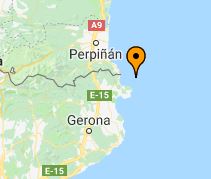
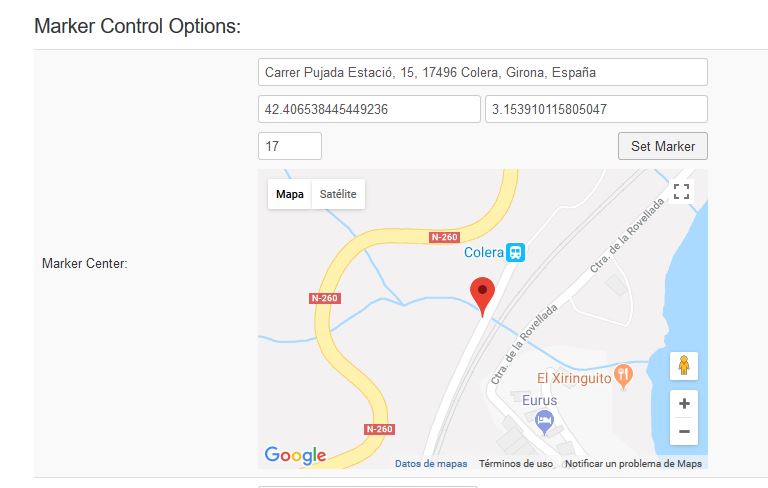
A example:
You can view the marker in the see, but I positioned this in hearth.
How can solve it.?
Thanks
Enrique
Please Log in to join the conversation.