
some problems to import from csv
- Daniel
- Offline
- Administrator
-

You do not have any active subscription, Please renew your subscription to continue receiving support and free upgrades.
Thanks
Daniel
Please Log in to join the conversation.
- Paolo Bianchi
- Topic Author
- Offline
- New Member
-

- Posts: 11
I'm trying to set an export with version 2.1.3 but I can not use any command, not even @vdPhp:(@vdLocal:column/1000) that you had suggested to return me exactly the text @vdPhp:(4.2000/1000)
please could you give me a working example to export a field divided by 1000 and to create a field as the algebraic sum of the contents of other columns?
... even if I bought this product a year ago it seems strange that I can not use it anymore
Thanks for your patience
Paul
Please Log in to join the conversation.
- Daniel
- Offline
- Administrator
-
Please download the latest package. and use the following: @vdPhp:(@vdLocal:column/1000)
Please note to Install the new version you would need to uninstall the previous one.
Thanks
Daniel
Please Log in to join the conversation.
- Paolo Bianchi
- Topic Author
- Offline
- New Member
-
- Posts: 11
could you show me the syntax to export one field divided by 1000?
thank you so much
Paolo
Please Log in to join the conversation.
- Daniel
- Offline
- Administrator
-
As stated earlier, You can not write Database queries with this keyword ( only functions can be used ). However for a workaround to your Problem, Please contact our Sales team via Contact us form, They'll look into it.
Thanks
Daniel
Please Log in to join the conversation.
- Paolo Bianchi
- Topic Author
- Offline
- New Member
-
- Posts: 11

I checked the command differences and noticed the quotes
from
vdPhp: substr_replace ("@ vdLocal: 1" -3)vdLocal: 0vdLocal: 2 / @ vdLocal: 3 R @ vdLocal: 5
to
vdPhp: substr_replace ("@ vdLocal: 1", "", -3). "-vdLocal: 0 -vdLocal: 2 / @ vdLocal: 3 R @ vdLocal: 5"
To understand how to set the controls, how can I write this correctly?
@vdSql:SELECT `manufacturer_id` FROM `estesa_jshopping_manufacturers` WHERE concat(`name_it-IT`, " ZO") = "@vdLocal:1" OR concat(`name_it-IT`, " WI") = "@vdLocal:1"
thanks again
Paul
Please Log in to join the conversation.
- Paolo Bianchi
- Topic Author
- Offline
- New Member
-
- Posts: 11
I have just send.
Please Log in to join the conversation.
- Daniel
- Offline
- Administrator
-
Please share your FTP and back end login credentials via Contact us form. We'll look into it.
Thanks
Daniel
Please Log in to join the conversation.
- Paolo Bianchi
- Topic Author
- Offline
- New Member
-
- Posts: 11
I am waiting for a response from a few days.
The suggestions you gave me did not work and I do not know how to do.
Please check why and put myself in a position to be able to use your product when I can not use.
thanks
Paul
Please Log in to join the conversation.
- Paolo Bianchi
- Topic Author
- Offline
- New Member
-
- Posts: 11
I'm sorry but also:
@vdPhp:substr_replace("@vdLocal:25", "", 0, strrpos("@vdLocal:25", "/", -1)+1)
don't work.
 ... ( with or without " ) also "basename" and Data("Y-m-d") ... nothing...
Please use the login credenzial that I have send you and verify my configuration and profiles.
why importation is incorrect? I don't understand it.
Thank you so much.

Please Log in to join the conversation.
- Daniel
- Offline
- Administrator
-
1. You need to pass some parameter in date() function e.g. @vdPhp:Date('Y-m-d')
2. For @vdPhp:substr_replace(@vdLocal:25, "", 0, strrpos(@vdLocal:25, "/", -1)+1) either you can use @vdPhp:basename("@vdLocal:25") or need to make a little change in the previous function as shown below:
@vdPhp:substr_replace("@vdLocal:25", "", 0, strrpos("@vdLocal:25", "/", -1)+1)
would recommend to use basename
3. With @vdSql you can write query only functions can be used.
Thanks
Daniel
Please Log in to join the conversation.
- Paolo Bianchi
- Topic Author
- Offline
- New Member
-
- Posts: 11
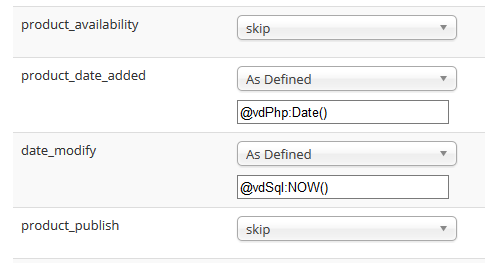
@vdPhp:Date()
does not work
but
@vdSql:NOW()
it's ok
Please Log in to join the conversation.
- Paolo Bianchi
- Topic Author
- Offline
- New Member
-
- Posts: 11
I realized what was the import problem of empty columns, I set the "CSV Column Enclosure" with "Semicolon" rather than with "Double Quote."
I'm sorry

But ...
I checked the result of the function:
> @vdPhp:substr_replace($a, "", 0, strrpos($a, "/", -1)+1)
that you have shown me
(adjusted in)
> @vdPhp:substr_replace(@vdLocal:25, "", 0, strrpos(@vdLocal:25, "/", -1)+1)
unfortunately it does not work and the result in the table is:
> @vdPhp:substr_replace( extras.tyre-energy.de/pic_9870g.jpg , "", 0, strrpos( extras.tyre-energy.de/pic_9870g.jpg , "/", -1)+1)
I also tried this command
> @vdPhp:substr(@vdLocal:1, -3) @vdLocal:0 @vdLocal:2/@vdLocal:3 R@vdLocal:5
and this "query"
> @vdSql:SELECT `manufacturer_id` FROM `wfhkz_jshopping_manufacturers` WHERE concat(`name_it-IT`, " ZO") = "@vdLocal:1" OR concat(`name_it-IT`, " WI") = "@vdLocal:1"
but it only seems to work "vdLocal"
Please Log in to join the conversation.
- Daniel
- Offline
- Administrator
-
We sent you a reply on that email. Login credentials you sent aren't working, Please check and revert back.
Thanks
Daniel
Please Log in to join the conversation.
- Paolo Bianchi
- Topic Author
- Offline
- New Member
-
- Posts: 11
I sent you the data that you're asking, but I have not received any answer yet.
you need any more information?
Thank you
Paolo
Please Log in to join the conversation.
- Paolo Bianchi
- Topic Author
- Offline
- New Member
-
- Posts: 11
thank you so much
Please Log in to join the conversation.
- Daniel
- Offline
- Administrator
-
It should work correctly. Have you made the required changes in Configuration for CSV file settings? If you have done this and still It's not working. Please share your FTP & Backend login credentials via Contact us form, We'll look into it.
Thanks
Daniel
Please Log in to join the conversation.
- Paolo Bianchi
- Topic Author
- Offline
- New Member
-
- Posts: 11
I try to better explain the point 1 with the example of csv I have attached.
when amount, "article", "brand" "whidth" "height", "speed" the fields are ok but the contents of the fields: "stock" "price" "EAN" who are after some empty columns is randomly filled with values that are located in other columns.
if I move the blank columns beyond the column EAN the imported content is correct.
Please Log in to join the conversation.
- Daniel
- Offline
- Administrator
-
Please find comments below:
1. Please clarify
2. Choose As defined option for the column in which you want to import this string while creating the profile and enter the following text string in the text field:
@vdLocal:1 @vdLocal:0 @vdLocal:2 @vdLocal:3 R@vdLocal:5
Where 1, 0, 2, 3, 5 are CSV Column indexes as per your CSV file
3. Choose as defined and enter the following in textfield:
@vdPhp:substr_replace($a, '', 0, strrpos($a, '/', -1)+1)
Please revert in case of any queries / concerns...
Thanks
Daniel
Please Log in to join the conversation.
- Paolo Bianchi
- Topic Author
- Offline
- New Member
-
- Posts: 11
I purchased VDATA and I would like some clarification:
1 I have problems to import data from a csv file (delimited by "semicolon").
The import is not successful for the following fields to some empty columns. it seems that the system does not recognize or does not accept missing fields in a column (although this is not directly affected by imports and is properly delimited by ";").
2 How can I customize a field so that it appears composed of multiple fields?
Ex: the field "description_it_IT" (in the table "#_jshopping_products") should be the result of the import fields: "Brend" + space + "Article" + space + "Whidt" + / + "Height" + space + R + "Rim "
Which must be: "BRIDGESTONE BR1054 215/65 R16"
... And how can I do?
3 How can I customize a string imported so that it is modified from the original to be imported?
Ex: the "url_pattern" field
" extras.tyre-energy.de/pic_910g.jpg " => "pic_910g.jpg"
" extras.tyre-energy.de/pic_12099g.jpg " => "pic_12099g.jpg"
" cartomak.net/profilbilder/cartomak3/brid...e/potenza_re_070.jpg " => "potenza_re_070.jpg"
Etc ..
... And how can I do?
I am attaching a sample csv file to import.
Thank you
Article;Brand;Width;Height;Speed;Rim;Loadindex;Pattern;Spec;PR/RF;Demo;Dot;Extra;Quality;Vehicle;Stock;Price;Discount;EAN;IPCODE;Fuel;Wet;Noise;Decibel;C Class;URL_Pattern;Per parcel;RFT;
BR1054;BRIDGESTONE ZO;215;65;RR;16;109R;R630; ; ; ; ;fz;Summer;Light Truck;100;81;62.41;"3286340105415";01054;E;C;2;72;C2; extras.tyre-energy.de/pic_9870g.jpg;2;0 ;
BR1063;BRIDGESTONE ZO;235;45;YR;17;94 Y;RE050; ; ; ; ;wz;Summer;Passenger Car;100;70.95;62.95;"3286340106313";01063;E;C;3;74;C1; extras.tyre-energy.de/pic_910g.jpg;2;0 ;
BR1142;BRIDGESTONE ZO;235;65;RR;16;115R;R630; ; ; ; ;fz;Summer;Light Truck;40;96;63.64;"3286340114219";01142;C;E;3;73;C2; extras.tyre-energy.de/pic_9870g.jpg;1;0 ;
Please Log in to join the conversation.