
Unable to edit chart with "Chart Data Manually"
- Daniel
- Offline
- Administrator
-

06 Dec 2016 13:26 #3488
by Daniel
Thanks
Daniel
Replied by Daniel on topic Unable to edit chart with "Chart Data Manually"
Hello,
Please share your FTP & Backend login credentials via Contact us form, We'll look into it.
Please share your FTP & Backend login credentials via Contact us form, We'll look into it.
Thanks
Daniel
Please Log in to join the conversation.
- Chet Brown
- Topic Author
- Offline
- New Member
-

Less
More
- Posts: 2
06 Dec 2016 12:54 #3487
by Chet Brown
Replied by Chet Brown on topic Unable to edit chart with "Chart Data Manually"
I upgraded to V1.8.0 and I am still not able to get that menu to show up for some of the charts.
Please Log in to join the conversation.
- Daniel
- Offline
- Administrator
-
06 Dec 2016 06:43 - 06 Dec 2016 06:46 #3486
by Daniel
Thanks
Daniel
Replied by Daniel on topic Unable to edit chart with "Chart Data Manually"
Hello,
Please download the latest version of vChart and try again. If it still doesn't resolve the issue, Please let us know. Please do not forget to take backup before upgradation.
Please download the latest version of vChart and try again. If it still doesn't resolve the issue, Please let us know. Please do not forget to take backup before upgradation.
Thanks
Daniel
Last edit: 06 Dec 2016 06:46 by Daniel.
Please Log in to join the conversation.
- Chet Brown
- Topic Author
- Offline
- New Member
-
Less
More
- Posts: 2
05 Dec 2016 17:52 #3480
by Chet Brown
Unable to edit chart with "Chart Data Manually" was created by Chet Brown
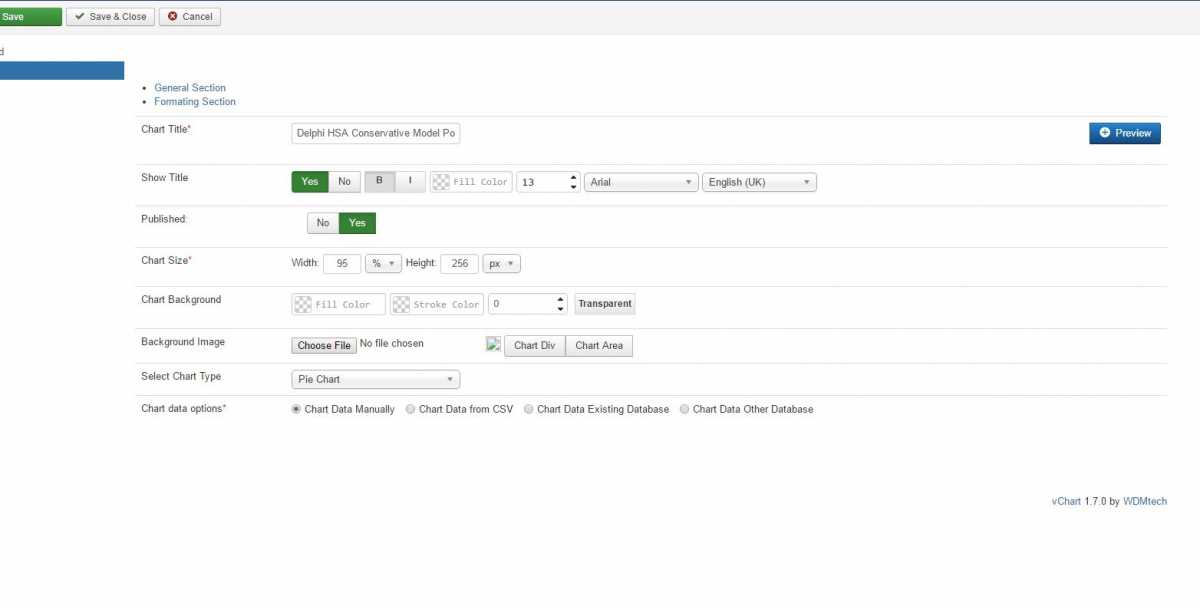
After several VCharts, the last couple ones that I created are not populating the Chart Data options when you try and edit the chart.
I have deleted them and recreated them several times, however nothing I do gets that menu to show back up after the 1st initial save.
Preview works fine, and it loads on the website great. However every ID past 108 will display the manual chart entry data in edit mode.
Any Ideas?
I have deleted them and recreated them several times, however nothing I do gets that menu to show back up after the 1st initial save.
Preview works fine, and it loads on the website great. However every ID past 108 will display the manual chart entry data in edit mode.
Any Ideas?
Please Log in to join the conversation.