
Simple Gauge Chart
- Patrick Connell
- Topic Author
- Offline
- New Member
-

Less
More
- Posts: 8
27 Jun 2016 02:33 #2812
by Patrick Connell
Replied by Patrick Connell on topic Simple Gauge Chart
Hi Dan,
I figured out the issue.
After installing the plugin, I ended up to have a default.php file in mod_vchart folder of the active temple folder of website.
When I reinstalled the updated version, the updated version was here: modules/mod_vchart/tmpl/default.php.
obviously it did not update the default.php file in template folder and since this one has more propriety, all chart were reading from old version.
Now it works fine.
Thanks
I figured out the issue.
After installing the plugin, I ended up to have a default.php file in mod_vchart folder of the active temple folder of website.
When I reinstalled the updated version, the updated version was here: modules/mod_vchart/tmpl/default.php.
obviously it did not update the default.php file in template folder and since this one has more propriety, all chart were reading from old version.
Now it works fine.
Thanks
Please Log in to join the conversation.
- Daniel
- Offline
- Administrator
-

24 Jun 2016 09:18 #2798
by Daniel
Thanks
Daniel
Replied by Daniel on topic Simple Gauge Chart
Hi,
Changes made into files on your server aren't reflecting, Please look into the matter and let us know when the issue is resolved.
Changes made into files on your server aren't reflecting, Please look into the matter and let us know when the issue is resolved.
Thanks
Daniel
Please Log in to join the conversation.
- Patrick Connell
- Topic Author
- Offline
- New Member
-
Less
More
- Posts: 8
24 Jun 2016 07:56 #2795
by Patrick Connell
Replied by Patrick Connell on topic Simple Gauge Chart
Hi,
I've made your user as a superuser, you should be able to login as a super user with the same user and Pass I sent you earlier.
Thanks
I've made your user as a superuser, you should be able to login as a super user with the same user and Pass I sent you earlier.
Thanks
Please Log in to join the conversation.
- Zaheer Abbas
- New Member
-
Less
More
24 Jun 2016 06:05 #2794
by Zaheer Abbas
Replied by Zaheer Abbas on topic Simple Gauge Chart
Hi
I have corrected the issue to show extra string with value. you can download our latest package.
if your problem is not solved than send your super user back end access details.
Thanks
Zaheer
I have corrected the issue to show extra string with value. you can download our latest package.
if your problem is not solved than send your super user back end access details.
Thanks
Zaheer
Please Log in to join the conversation.
- Patrick Connell
- Topic Author
- Offline
- New Member
-
Less
More
- Posts: 8
24 Jun 2016 01:27 #2793
by Patrick Connell
Replied by Patrick Connell on topic Simple Gauge Chart
Hi Dan,
I've downloaded the new version form "My download" section of my account! Same a before Can not see any % sign!
It's getting a bit annoying and I need to show the feature to client ASAP.
Can you please investigate that?
Thanks
I've downloaded the new version form "My download" section of my account! Same a before Can not see any % sign!
It's getting a bit annoying and I need to show the feature to client ASAP.
Can you please investigate that?
Thanks
Please Log in to join the conversation.
- Daniel
- Offline
- Administrator
-
23 Jun 2016 09:40 #2781
by Daniel
Thanks
Daniel
Replied by Daniel on topic Simple Gauge Chart
Hi Patrick,
Please download and install the latest package. The error has been resolved.
Please download and install the latest package. The error has been resolved.
Thanks
Daniel
Please Log in to join the conversation.
- Patrick Connell
- Topic Author
- Offline
- New Member
-
Less
More
- Posts: 8
23 Jun 2016 07:51 #2780
by Patrick Connell
Replied by Patrick Connell on topic Simple Gauge Chart
Sent you an email.
Thanks heaps
Thanks heaps
Please Log in to join the conversation.
- Zaheer Abbas
- New Member
-
Less
More
23 Jun 2016 06:33 #2779
by Zaheer Abbas
Replied by Zaheer Abbas on topic Simple Gauge Chart
Hi Patrick,
Please share your back end login credentials or front end url via Contact us form, We'll look into it.
thanks
Zaheer
Please share your back end login credentials or front end url via Contact us form, We'll look into it.
thanks
Zaheer
Please Log in to join the conversation.
- Patrick Connell
- Topic Author
- Offline
- New Member
-
Less
More
- Posts: 8
23 Jun 2016 06:07 #2778
by Patrick Connell
Replied by Patrick Connell on topic Simple Gauge Chart
Sorry I can't provide FTP details, is there any other way you can investigate?
and why does it make website so slow?!
and why does it make website so slow?!
Please Log in to join the conversation.
- Zaheer Abbas
- New Member
-
Less
More
21 Jun 2016 08:31 #2759
by Zaheer Abbas
Replied by Zaheer Abbas on topic Simple Gauge Chart
Hi Patrick,
Please share your back end & FTP login credentials via Contact us form, We'll look into it.
Please share your back end & FTP login credentials via Contact us form, We'll look into it.
Please Log in to join the conversation.
- Patrick Connell
- Topic Author
- Offline
- New Member
-
Less
More
- Posts: 8
21 Jun 2016 08:12 #2758
by Patrick Connell
Replied by Patrick Connell on topic Simple Gauge Chart
Hi Dan,
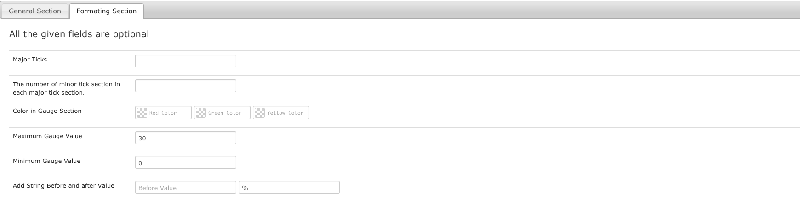
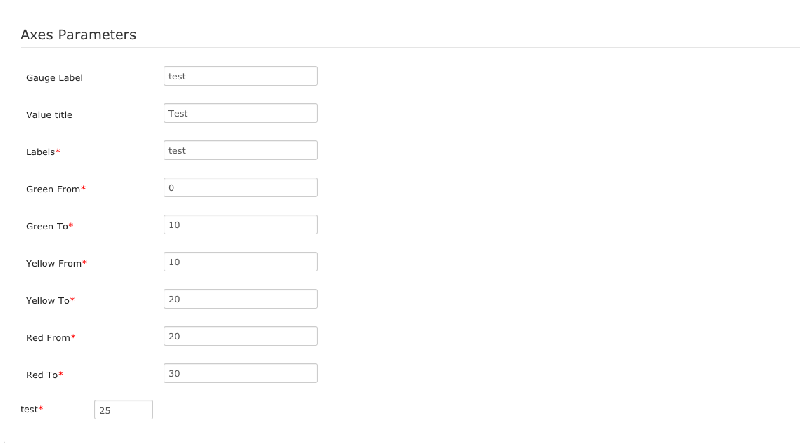
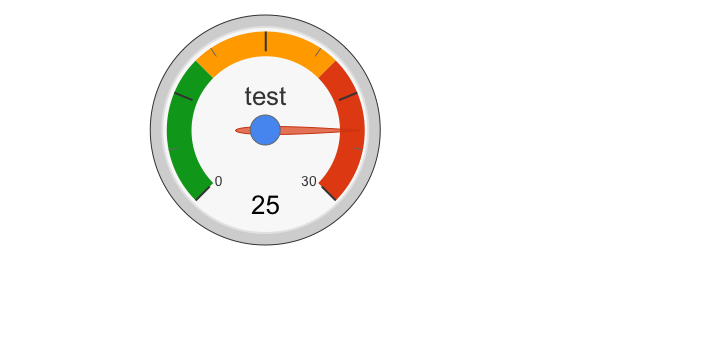
Thanks for your reply, I've updated my plugin to newest version and put the changes, as you can see in screen shots. But the % sign does not show up in my chart view.
Any idea?!
Thanks for your reply, I've updated my plugin to newest version and put the changes, as you can see in screen shots. But the % sign does not show up in my chart view.
Any idea?!
Please Log in to join the conversation.
- Daniel
- Offline
- Administrator
-
20 Jun 2016 11:33 #2754
by Daniel
Thanks
Daniel
Replied by Daniel on topic Simple Gauge Chart
Hi Daniel,
Please download the latest version. Percent sign has been added. And You can not hide it some gauges while It shows for others.
Please download the latest version. Percent sign has been added. And You can not hide it some gauges while It shows for others.
Thanks
Daniel
Please Log in to join the conversation.
- Patrick Connell
- Topic Author
- Offline
- New Member
-
Less
More
- Posts: 8
20 Jun 2016 08:45 #2753
by Patrick Connell
Replied by Patrick Connell on topic Simple Gauge Chart
Hi Daniel,
Thanks for your reply.
I've got another question, How can I add a % sign after the value in the gauge?! I know I can do it by this line:
var formatter = new google.visualization.NumberFormat(
{suffix: '%',pattern:'#'}
);
But where should I put in your plugin?! and is there any chance to hide it for some gauges while it's showing up for others?!
Thanks a lot
Thanks for your reply.
I've got another question, How can I add a % sign after the value in the gauge?! I know I can do it by this line:
var formatter = new google.visualization.NumberFormat(
{suffix: '%',pattern:'#'}
);
But where should I put in your plugin?! and is there any chance to hide it for some gauges while it's showing up for others?!
Thanks a lot
Please Log in to join the conversation.
- Daniel
- Offline
- Administrator
-
17 Jun 2016 10:17 #2750
by Daniel
Thanks
Daniel
Replied by Daniel on topic Simple Gauge Chart
Hi Patrick,
Google Chart API allows you to add 3 colours only.
Chart can be made clickable but only after customisation. For customisation, Please contact our Sales team via Contact us form.
Google Chart API allows you to add 3 colours only.
Chart can be made clickable but only after customisation. For customisation, Please contact our Sales team via Contact us form.
Thanks
Daniel
Please Log in to join the conversation.
- Patrick Connell
- Topic Author
- Offline
- New Member
-
Less
More
- Posts: 8
17 Jun 2016 08:55 #2749
by Patrick Connell
Simple Gauge Chart was created by Patrick Connell
Hi there,
I just bought your plugin,in Simple Gauge Chart I need to add more colours, currently there is only 3 of them (Red,yellow and green). Can you please let me know how can I add more colours?!
And how can I make the chart clickable, so by clicking on the chart it goes to a specific page I want?!is there any place I can put the URL?!
I would really appropriate if you can get back to me ASAP.
Thanks
I just bought your plugin,in Simple Gauge Chart I need to add more colours, currently there is only 3 of them (Red,yellow and green). Can you please let me know how can I add more colours?!
And how can I make the chart clickable, so by clicking on the chart it goes to a specific page I want?!is there any place I can put the URL?!
I would really appropriate if you can get back to me ASAP.
Thanks
Please Log in to join the conversation.