
Resonsive Design
- Soni
- Offline
- Banned
-

Less
More
- Posts: 40
18 Apr 2018 06:39 #5856
by Soni
Replied by Soni on topic Resonsive Design
Hi
You will have to give width and height in editor html in which you want to display chart because the div of article html in which chart have to display, have no width and height, so give width and height to in which div you want to display chart.
Thanks
Zaheer
You will have to give width and height in editor html in which you want to display chart because the div of article html in which chart have to display, have no width and height, so give width and height to in which div you want to display chart.
Thanks
Zaheer
Please Log in to join the conversation.
- Suckerpunch
- Offline
- New Member
-

Less
More
- Posts: 3
17 Apr 2018 19:34 #5854
by Suckerpunch
Replied by Suckerpunch on topic Resonsive Design
Any updates to this? I posted screenshots of the issue.
Please Log in to join the conversation.
- Suckerpunch
- Offline
- New Member
-
Less
More
- Posts: 3
13 Apr 2018 14:51 #5848
by Suckerpunch
Replied by Suckerpunch on topic Resonsive Design
Unfortunately, we are unable to share the back end login/details, as this is on a working client website.
As you can see in my code below, there is an inline style being applied to the element (width:400px), despite having the width of the chart set in the back end to '100%'. This is output from the module code itself.
As I mentioned, the chart displays correctly when it is a menu item. However, when you are embedding the chart as a module (using the include vchart loadmodule plugin) it give it a static width of 400px.
I've attached screenshots that should show you that the output from loadmodule is buggy.
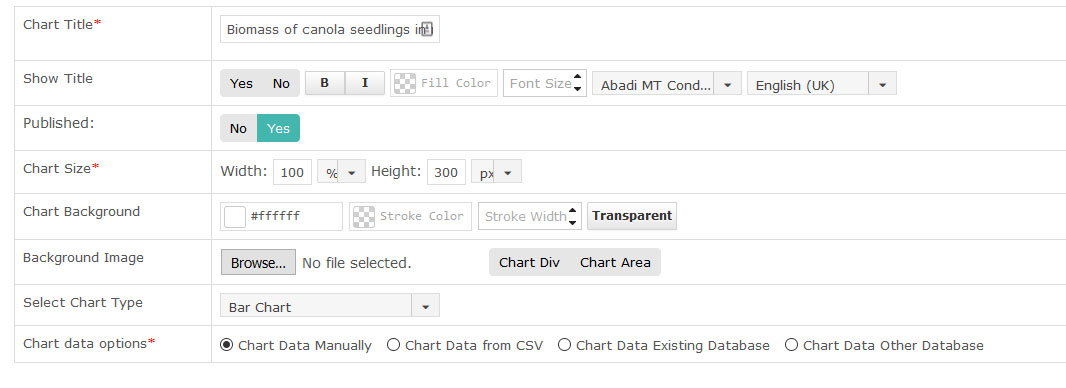
vchart1.jpg shows my chart settings: Width is set to 100%.
vchart2 shows the html markup output by the plugin (note the width:400px;)
vchart3 shows the parent container of the chart (note the available room, defined by the blue area)
vchart4 shows the size of the chart module.
I have no CSS conflicts, as no other components in my CSS file are using the vchart namespace.
As you can see in my code below, there is an inline style being applied to the element (width:400px), despite having the width of the chart set in the back end to '100%'. This is output from the module code itself.
As I mentioned, the chart displays correctly when it is a menu item. However, when you are embedding the chart as a module (using the include vchart loadmodule plugin) it give it a static width of 400px.
I've attached screenshots that should show you that the output from loadmodule is buggy.
vchart1.jpg shows my chart settings: Width is set to 100%.
vchart2 shows the html markup output by the plugin (note the width:400px;)
vchart3 shows the parent container of the chart (note the available room, defined by the blue area)
vchart4 shows the size of the chart module.
I have no CSS conflicts, as no other components in my CSS file are using the vchart namespace.


Please Log in to join the conversation.
- Daniel
- Offline
- Administrator
-

13 Apr 2018 06:37 #5846
by Daniel
Thanks
Daniel
Replied by Daniel on topic Resonsive Design
Hello,
It's a CSS conflict, Please share your backend & FTP login credentials via Contact us form, We'll look into it.
It's a CSS conflict, Please share your backend & FTP login credentials via Contact us form, We'll look into it.
Thanks
Daniel
Please Log in to join the conversation.
- Suckerpunch
- Offline
- New Member
-
Less
More
- Posts: 3
12 Apr 2018 20:53 - 12 Apr 2018 20:54 #5844
by Suckerpunch
Replied by Suckerpunch on topic Resonsive Design
Hello,
I have noticed a similar bug: Using Percentage works when it is a Component Page.
However, when the chart is embedded in an article, it seems to ignore the percent.
I can see that the containing element of the chart gets a fixed with and height:
I have noticed a similar bug: Using Percentage works when it is a Component Page.
However, when the chart is embedded in an article, it seems to ignore the percent.
I can see that the containing element of the chart gets a fixed with and height:
Code:
<div class="vchar_info">
<div id="vchart_1000" class="chart_div share_option">
<div style="position: relative;">
<div style="position: relative; width: 400px; height: 300px;" dir="ltr">
[CHART HERE]
</div>
</div>
</div>
</div>
Last edit: 12 Apr 2018 20:54 by Suckerpunch.
Please Log in to join the conversation.
- Daniel
- Offline
- Administrator
-
25 Aug 2017 07:17 #4745
by Daniel
Thanks
Daniel
Replied by Daniel on topic Resonsive Design
Hello,
Please share your backend & FTP login credentials via Contact us form, We'll look into it. The chart is still taking width in pixels.
Please share your backend & FTP login credentials via Contact us form, We'll look into it. The chart is still taking width in pixels.
Thanks
Daniel
Please Log in to join the conversation.
- Martin Wittmann
- Topic Author
- Offline
- New Member
-
Less
More
- Posts: 3
24 Aug 2017 13:30 #4743
by Martin Wittmann
Replied by Martin Wittmann on topic Resonsive Design
Hello, thanks for the tip. Now I have set it to 100% width. The chart is now very small and does not change its width even if I make the browser window very narrow and reload the contents.
Best regards
Best regards
Please Log in to join the conversation.
- Daniel
- Offline
- Administrator
-
24 Aug 2017 10:56 #4735
by Daniel
Thanks
Daniel
Replied by Daniel on topic Resonsive Design
Hello,
You need to have chart width in percentage. Can you please let me know what width have you entered in Chart settings in backend? Is it in pixels or percentage?
You need to have chart width in percentage. Can you please let me know what width have you entered in Chart settings in backend? Is it in pixels or percentage?
Thanks
Daniel
Please Log in to join the conversation.
- Martin Wittmann
- Topic Author
- Offline
- New Member
-
Less
More
- Posts: 3
24 Aug 2017 05:48 #4734
by Martin Wittmann
Replied by Martin Wittmann on topic Resonsive Design
Hello,
I will send you a link. The page is currently being edited. However, it can be seen here that the chart does not adjust in width and goes beyond the edge.
www.landhagen.de/2017/index.php?option=c...le&id=115&Itemid=662
Best regards
I will send you a link. The page is currently being edited. However, it can be seen here that the chart does not adjust in width and goes beyond the edge.
www.landhagen.de/2017/index.php?option=c...le&id=115&Itemid=662
Best regards
Please Log in to join the conversation.
- Daniel
- Offline
- Administrator
-
23 Aug 2017 10:44 #4728
by Daniel
Thanks
Daniel
Replied by Daniel on topic Resonsive Design
Hello,
It's already responsive, You do not need to activate anything.
It's already responsive, You do not need to activate anything.
Thanks
Daniel
Please Log in to join the conversation.
- Martin Wittmann
- Topic Author
- Offline
- New Member
-
Less
More
- Posts: 3
23 Aug 2017 10:32 #4727
by Martin Wittmann
Resonsive Design was created by Martin Wittmann
Hello
Where can I activate the Responsive Design display for the charts?
Thanks
Best regards
Where can I activate the Responsive Design display for the charts?
Thanks
Best regards
Please Log in to join the conversation.