
Adding to front end
- Daniel
- Offline
- Administrator
-

19 Mar 2016 00:54 #2216
by Daniel
Thanks
Daniel
Replied by Daniel on topic Adding to front end
Hello Jose,
Are you logged in with a registered user? And vAccount Dashboard access is allowed for registered users. You can check it in vAccount -> Configuration in administrator section. If It's allowed and still you are not able to access the Dashboard, please share your FTP & Backend login credentials via Contact us form, We'll look into it.
Are you logged in with a registered user? And vAccount Dashboard access is allowed for registered users. You can check it in vAccount -> Configuration in administrator section. If It's allowed and still you are not able to access the Dashboard, please share your FTP & Backend login credentials via Contact us form, We'll look into it.
Thanks
Daniel
Please Log in to join the conversation.
- Jose Yauri
- Offline
- New Member
-

Less
More
18 Mar 2016 22:35 #2215
by Jose Yauri
I did as the quote, but I get the message:
Error
You are not authorised to view this resource.
I set the menu to be accessed only for registered users
Please help with a solution
Replied by Jose Yauri on topic Adding to front end
Daniel wrote: Hello,
Yes It's quite possible you just need to set up the ACL as per your need -> Publish a Menu for vAccount Dashboard -> It's all done.
I did as the quote, but I get the message:
Error
You are not authorised to view this resource.
I set the menu to be accessed only for registered users
Please help with a solution
Please Log in to join the conversation.
- Daniel
- Offline
- Administrator
-
10 Feb 2016 05:52 - 10 Feb 2016 05:53 #1998
by Daniel
Thanks
Daniel
Replied by Daniel on topic Adding to front end
Hello,
Yes It's quite possible you just need to set up the ACL as per your need -> Publish a Menu for vAccount Dashboard -> It's all done.
Yes It's quite possible you just need to set up the ACL as per your need -> Publish a Menu for vAccount Dashboard -> It's all done.
Thanks
Daniel
Last edit: 10 Feb 2016 05:53 by Daniel.
Please Log in to join the conversation.
- Lourdes Garibay
- Offline
- New Member
-
Less
More
- Posts: 14
09 Feb 2016 15:00 #1995
by Lourdes Garibay
Replied by Lourdes Garibay on topic Adding to front end
Hello, I want to add a module to the front end, How can I do this?? my team can use it from there instead of logging onto the administrator side? It says that access is possible.
Thank you.
Thank you.
Please Log in to join the conversation.
- Daniel
- Offline
- Administrator
-
14 Jan 2016 05:40 #1879
by Daniel
Thanks
Daniel
Replied by Daniel on topic Template issues on front end
Hi Doug,
An email is sent to you, Please check...
An email is sent to you, Please check...
Thanks
Daniel
Please Log in to join the conversation.
- Doug Blemker
- Topic Author
- Offline
- New Member
-
Less
More
- Posts: 10
14 Jan 2016 02:11 #1878
by Doug Blemker
Replied by Doug Blemker on topic Template issues on front end
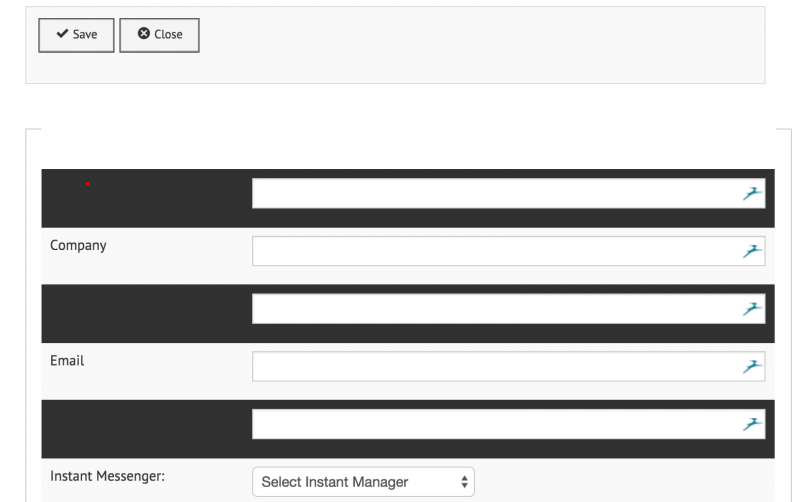
I've figured this out and added the menu but the template I'm using (an RSJoomla template) doesn't allow some of the fields to show properly. I have changed the menu item to default to a standard protostar template. However, when I add a vendor from the front end and the pop-up boxes happen, they go to the site template and the user cannot see the fields to enter vendors properly.
Any suggestions to easily fix? I'll need to do it for any popups.
Any suggestions to easily fix? I'll need to do it for any popups.
Please Log in to join the conversation.
- Doug Blemker
- Topic Author
- Offline
- New Member
-
Less
More
- Posts: 10
13 Jan 2016 20:50 #1877
by Doug Blemker
Adding to front end was created by Doug Blemker
How do I add the module to the front end so my team can use it from there instead of logging onto the administrator side? It says that access is possible.
Thank you.
Thank you.
Please Log in to join the conversation.