
VMap Info Window Photo
- Daniel
- Offline
- Administrator
-

14 Mar 2015 15:28 #862
by Daniel
Thanks
Daniel
Replied by Daniel on topic VMap Info Window Photo
Hi,
Please send us your back end & FTP login credentials via Contact Us form, We'll look into it.
Please send us your back end & FTP login credentials via Contact Us form, We'll look into it.
Thanks
Daniel
Please Log in to join the conversation.
- Rommen Semeniuk
- Topic Author
- Offline
- New Member
-

Less
More
- Posts: 15
14 Mar 2015 15:18 #861
by Rommen Semeniuk
Replied by Rommen Semeniuk on topic VMap Info Window Photo
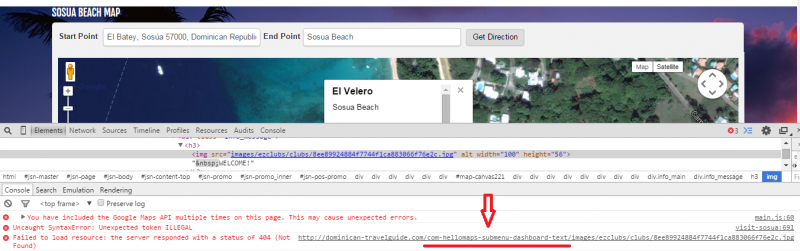
For some reason, there seems some change in the URL - when I remove the part marked in red in the screenshot - "com-hellomaps-submenu-dashboard-text" - I can access the image.
Please Log in to join the conversation.
- Rommen Semeniuk
- Topic Author
- Offline
- New Member
-
Less
More
- Posts: 15
14 Mar 2015 15:05 #860
by Rommen Semeniuk
Replied by Rommen Semeniuk on topic VMap Info Window Photo
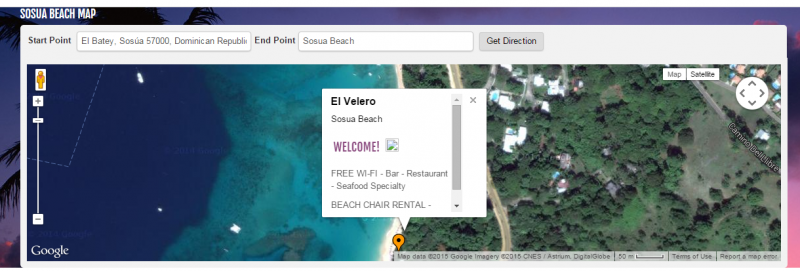
PLEASE HELP! I had to reinstall Joomla - and now my VMap is not displaying the images - evrything is configured the same - but it is not accepting the image?
The Marker editor does not allow me to access the image directly?
The Marker editor does not allow me to access the image directly?
Please Log in to join the conversation.
- Rommen Semeniuk
- Topic Author
- Offline
- New Member
-
Less
More
- Posts: 15
30 Dec 2014 14:26 #656
by Rommen Semeniuk
Replied by Rommen Semeniuk on topic VMap Info Window Photo
Once I configured my Joomla to re-write urls and remove the 'index/php' the photos were able to display!
Please Log in to join the conversation.
- Daniel
- Offline
- Administrator
-
23 Dec 2014 07:15 #643
by Daniel
Thanks
Daniel
Replied by Daniel on topic VMap Info Window Photo
Yeah, you are right. That's your editor which is truncating all the internal URLs. For now you can edit the text without using WYSIWYG Editor, we'll let you know the solution soon.
Thanks
Daniel
Please Log in to join the conversation.
- Rommen Semeniuk
- Topic Author
- Offline
- New Member
-
Less
More
- Posts: 15
22 Dec 2014 22:12 #642
by Rommen Semeniuk
Replied by Rommen Semeniuk on topic VMap Info Window Photo
As an experiment, I entered the URL of a photo from AN OUTSIDE WEBSITE - and the photo displayed properly.
When I enter a URL from INSIDE my own site it creates an ERROR.
When I enter a URL from INSIDE my own site it creates an ERROR.
Please Log in to join the conversation.
- Rommen Semeniuk
- Topic Author
- Offline
- New Member
-
Less
More
- Posts: 15
19 Dec 2014 12:32 #637
by Rommen Semeniuk
Replied by Rommen Semeniuk on topic VMap Info Window Photo
Actually, I get a 404 error when I follow that path. I do not know how to obtain the correct URL.
Please Log in to join the conversation.
- Rommen Semeniuk
- Topic Author
- Offline
- New Member
-
Less
More
- Posts: 15
19 Dec 2014 12:29 #636
by Rommen Semeniuk
Replied by Rommen Semeniuk on topic VMap Info Window Photo
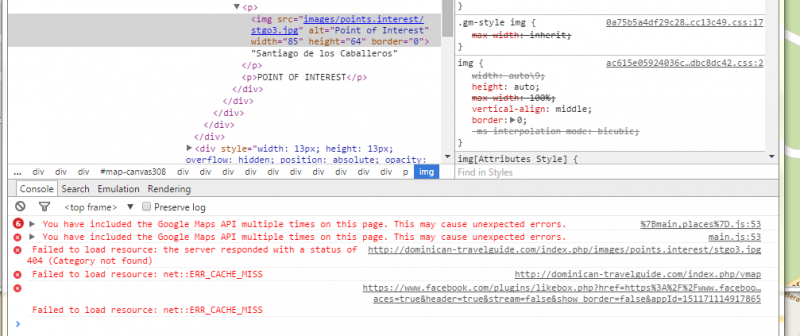
I have tried entering the full URL - and the images appear correctly on the HOME PAGE.
dominican-travelguide.com/index.php/imag...s.interest/stgo3.jpg
Here is the Elements Inspection showing the full URL which failed to load:
dominican-travelguide.com/index.php/imag...s.interest/stgo3.jpg
Here is the Elements Inspection showing the full URL which failed to load:
Please Log in to join the conversation.
- Daniel
- Offline
- Administrator
-
19 Dec 2014 07:12 #635
by Daniel
Thanks
Daniel
Replied by Daniel on topic VMap Info Window Photo
Hi,
It's an issue with image path, You are giving relative path in the editor and due to SEF URLs, It's prepending the page url to the image path. Try to add full path for the image in editor. We're looking for some solution for this, will let you know soon.
It's an issue with image path, You are giving relative path in the editor and due to SEF URLs, It's prepending the page url to the image path. Try to add full path for the image in editor. We're looking for some solution for this, will let you know soon.
Thanks
Daniel
Please Log in to join the conversation.
- Rommen Semeniuk
- Topic Author
- Offline
- New Member
-
Less
More
- Posts: 15
18 Dec 2014 14:26 #634
by Rommen Semeniuk
Replied by Rommen Semeniuk on topic VMap Info Window Photo
I added a page to the VMap demos - with ONLY two VMaps ... STILL THE SAME PROBLEM with the photo display.
The link to this page: dominican-travelguide.com/index.php/vmap/2vmap
By the way, I have added a second VMap to the HOME page - and the photo displays CORRECTLY in both maps?!
(These VMaps are all copies.)
The link to this page: dominican-travelguide.com/index.php/vmap/2vmap
By the way, I have added a second VMap to the HOME page - and the photo displays CORRECTLY in both maps?!
(These VMaps are all copies.)
Please Log in to join the conversation.
- Daniel
- Offline
- Administrator
-
18 Dec 2014 06:24 #632
by Daniel
Thanks
Daniel
Replied by Daniel on topic VMap Info Window Photo
Hi,
You can use multiple vMaps on a single page, the issue is with the other map. Please try to load two vMaps on a single page.
You can use multiple vMaps on a single page, the issue is with the other map. Please try to load two vMaps on a single page.
Thanks
Daniel
Please Log in to join the conversation.
- Rommen Semeniuk
- Topic Author
- Offline
- New Member
-
Less
More
- Posts: 15
16 Dec 2014 13:56 #625
by Rommen Semeniuk
Replied by Rommen Semeniuk on topic VMap Info Window Photo
Here is a view
Please Log in to join the conversation.
- Rommen Semeniuk
- Topic Author
- Offline
- New Member
-
Less
More
- Posts: 15
16 Dec 2014 13:53 #623
by Rommen Semeniuk
VMap Info Window Photo was created by Rommen Semeniuk
The photo in the Info Window does not show on all pages.
The problem seems to be on pages that have more than one map. Pages with only one VMap display the photo correctly.
The problem seems to be on pages that have more than one map. Pages with only one VMap display the photo correctly.
Please Log in to join the conversation.