
Help
- Daniel
- Offline
- Administrator
-

09 Apr 2016 07:30 - 09 Apr 2016 07:36 #2345
by Daniel
Thanks
Daniel
Replied by Daniel on topic Help - I cannot add a review now!
Hi Alex,
Since a user can only rate the Item a single time and you already submitted your rating which was unpublished, that's why You were not able to do anything. Now we have published the rating you submitted using backend, You can edit it, Please check...
Since a user can only rate the Item a single time and you already submitted your rating which was unpublished, that's why You were not able to do anything. Now we have published the rating you submitted using backend, You can edit it, Please check...
Thanks
Daniel
Last edit: 09 Apr 2016 07:36 by Daniel.
Please Log in to join the conversation.
- Alex Atkinson
- Offline
- New Member
-

Less
More
- Posts: 4
07 Apr 2016 14:37 #2326
by Alex Atkinson
Replied by Alex Atkinson on topic Help - I cannot add a review now!
Hi Daniel,
I honestly thought this would be a very simple process, I am clearly missing something.
I cannot add any comments/text to the box, why would that be do you think?
There does not appear to be any button to go with the submit review text link, which also does not appear to work. I had hoped that it would be a simple process. Can you please assist.
Also with the component in, the URL has since changed from this when it is disabled:
derektaylorfencing.co.uk/testimonials
to this when enabled:
derektaylorfencing.co.uk/testimonials?limitstart=0
Thanks once again, in advance.
Alex
I honestly thought this would be a very simple process, I am clearly missing something.
I cannot add any comments/text to the box, why would that be do you think?
There does not appear to be any button to go with the submit review text link, which also does not appear to work. I had hoped that it would be a simple process. Can you please assist.
Also with the component in, the URL has since changed from this when it is disabled:
derektaylorfencing.co.uk/testimonials
to this when enabled:
derektaylorfencing.co.uk/testimonials?limitstart=0
Thanks once again, in advance.
Alex
Please Log in to join the conversation.
- Daniel
- Offline
- Administrator
-
07 Apr 2016 14:06 #2325
by Daniel
Thanks
Daniel
Replied by Daniel on topic Help
Hi Alex,
This is not a part of your purchase. Here is the URL to this plugin:
www.wdmtech.com/vreview-for-joomla-articles
This is not a part of your purchase. Here is the URL to this plugin:
www.wdmtech.com/vreview-for-joomla-articles
Thanks
Daniel
Please Log in to join the conversation.
- Alex Atkinson
- Offline
- New Member
-
Less
More
- Posts: 4
- Daniel
- Offline
- Administrator
-
07 Apr 2016 13:57 #2323
by Daniel
Thanks
Daniel
Replied by Daniel on topic Help
Hi Alex,
Shortcode feature isn't available right now. However with vReview Article plugin you can display the reviews and review form after each article on article list / detail page.
Shortcode feature isn't available right now. However with vReview Article plugin you can display the reviews and review form after each article on article list / detail page.
Thanks
Daniel
Please Log in to join the conversation.
- Alex Atkinson
- Offline
- New Member
-
Less
More
- Posts: 4
07 Apr 2016 13:48 #2322
by Alex Atkinson
Replied by Alex Atkinson on topic Help
Hi Daniel,
Quick question, is there a way to add the vReviews into a page using a shortcode?
i.e {gallery id=mygallery layout=hidden}Acceptanceofquotationform{/gallery}
Just a thought, thanks.
Alex
Quick question, is there a way to add the vReviews into a page using a shortcode?
i.e {gallery id=mygallery layout=hidden}Acceptanceofquotationform{/gallery}
Just a thought, thanks.
Alex
Please Log in to join the conversation.
- Waseem Khan
- Offline
- Banned
-

Less
More
- Posts: 13
- Alex Atkinson
- Offline
- New Member
-
Less
More
- Posts: 4
07 Apr 2016 12:23 #2320
by Alex Atkinson
Replied by Alex Atkinson on topic Help
Hi Daniel,
I am not sure why you sent that reply.
It was disabled already but this does not answer my question. Where can I amend the styles/layout of the component?
Thanks in advance.
Alex
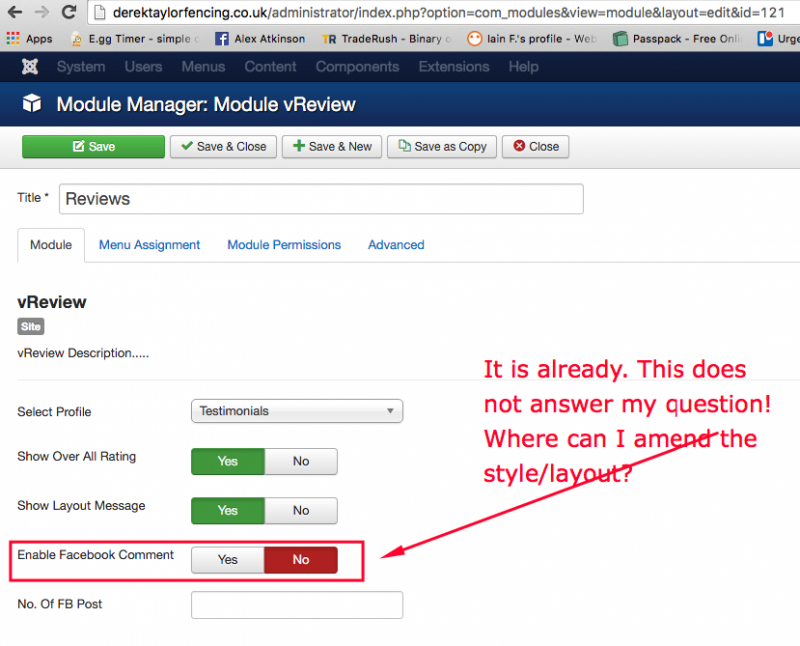
I am not sure why you sent that reply.
It was disabled already but this does not answer my question. Where can I amend the styles/layout of the component?
Thanks in advance.
Alex
Please Log in to join the conversation.
- Daniel
- Offline
- Administrator
-
- Alex Atkinson
- Offline
- New Member
-
Less
More
- Posts: 4
- Daniel
- Offline
- Administrator
-
30 Mar 2016 15:30 #2277
by Daniel
Thanks
Daniel
Replied by Daniel on topic Help
Hi Alex,
You don't need to create a new position for this. You can publish on any position available in your template. It doesn't look similar to our demo, because you have disabled star rating and comments and have enabled facebook comments. Disable facebook comments to make it look like the Demo.
You don't need to create a new position for this. You can publish on any position available in your template. It doesn't look similar to our demo, because you have disabled star rating and comments and have enabled facebook comments. Disable facebook comments to make it look like the Demo.
Thanks
Daniel
Please Log in to join the conversation.
- Alex Atkinson
- Offline
- New Member
-
Less
More
- Posts: 4
30 Mar 2016 15:24 #2276
by Alex Atkinson
Replied by Alex Atkinson on topic Help
HI Daniel,
Thanks for that.
Two things, firstly, do I need to create a new module position for it to site under the main body content? Secondly, it looks nothing like it does in the demo, is there a reason for that? Have I missed something? Naturally it needs styled to sit with the rest of the site which I understand.
Thanks,
Alex
Thanks for that.
Two things, firstly, do I need to create a new module position for it to site under the main body content? Secondly, it looks nothing like it does in the demo, is there a reason for that? Have I missed something? Naturally it needs styled to sit with the rest of the site which I understand.
Thanks,
Alex
Please Log in to join the conversation.
- Daniel
- Offline
- Administrator
-
- Alex Atkinson
- Offline
- New Member
-
Less
More
- Posts: 4
29 Mar 2016 14:17 - 29 Mar 2016 14:24 #2265
by Alex Atkinson
Replied by Alex Atkinson on topic Help
Hi Daniel,
Many thanks for that, I really do appreciate it. Please let me know what I did wrong or missed!
Below are the login details:
****
The URL I would like the reviews on is listed below. However this is set to visibility for super users only until I get this sorted:
derektaylorfencing.co.uk/testimonials
Thanks in advance, hopefully for the final time.
Alex
Many thanks for that, I really do appreciate it. Please let me know what I did wrong or missed!
Below are the login details:
****
The URL I would like the reviews on is listed below. However this is set to visibility for super users only until I get this sorted:
derektaylorfencing.co.uk/testimonials
Thanks in advance, hopefully for the final time.
Alex
Last edit: 29 Mar 2016 14:24 by Daniel. Reason: removed login access for security purpose
Please Log in to join the conversation.
- Daniel
- Offline
- Administrator
-
- Alex Atkinson
- Offline
- New Member
-
Less
More
- Posts: 4
29 Mar 2016 14:10 #2263
by Alex Atkinson
Replied by Alex Atkinson on topic Help
Hi Daniel,
That is exactly what I have done. See attached screen grab.
The only other issue is it may be is the module position but I have tried various ones, but still nothing shows, it is bizarre really. I did think it would be easier than this to add, I must be missing something, just not sure what it is.
Thanks,
Alex
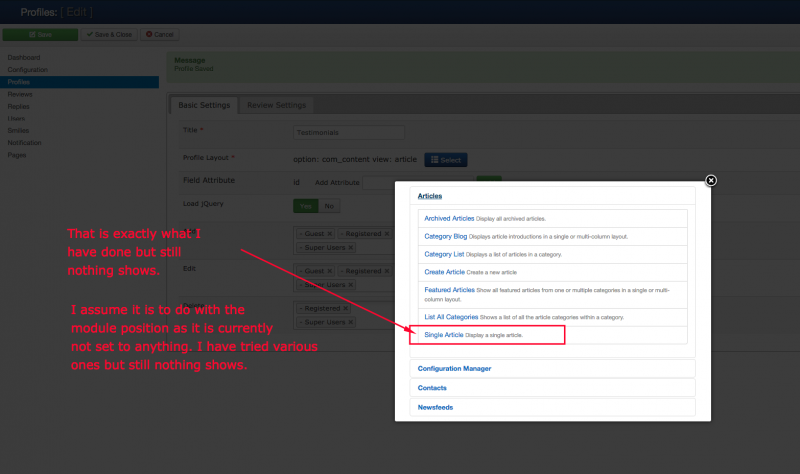
That is exactly what I have done. See attached screen grab.
The only other issue is it may be is the module position but I have tried various ones, but still nothing shows, it is bizarre really. I did think it would be easier than this to add, I must be missing something, just not sure what it is.
Thanks,
Alex
Please Log in to join the conversation.
- Daniel
- Offline
- Administrator
-
- Alex Atkinson
- Offline
- New Member
-
Less
More
- Posts: 4
29 Mar 2016 12:06 #2260
by Alex Atkinson
Replied by Alex Atkinson on topic Help
Hi Daniel,
Below is the layout I want to appear on any specified page. (But would like to add it to others as required)
www.joomlawings.com/article-detail-layou...-rating?limitstart=0
So what do I need to do/select to display the above?
Thanks,
Alex
Below is the layout I want to appear on any specified page. (But would like to add it to others as required)
www.joomlawings.com/article-detail-layou...-rating?limitstart=0
So what do I need to do/select to display the above?
Thanks,
Alex
Please Log in to join the conversation.
- Alex Atkinson
- Offline
- New Member
-
Less
More
- Posts: 4
29 Mar 2016 11:53 #2259
by Alex Atkinson
Replied by Alex Atkinson on topic Help
Hi Daniel,
Thanks for coming back to me. I had hoped that once I created the module and specified which page I wanted it to display on, it would appear under the main body content but above the footer. See attached screen grab.
Not sure if I need to create a new position above the footer or not.
Also when selecting an option within profiles, it isn't clear as to what you are selecting. I am selecting single article as the option but regardless of what I select, nothing is showing.
Thanks in advance.
Alex
Thanks for coming back to me. I had hoped that once I created the module and specified which page I wanted it to display on, it would appear under the main body content but above the footer. See attached screen grab.
Not sure if I need to create a new position above the footer or not.
Also when selecting an option within profiles, it isn't clear as to what you are selecting. I am selecting single article as the option but regardless of what I select, nothing is showing.
Thanks in advance.
Alex
Please Log in to join the conversation.
- Daniel
- Offline
- Administrator
-