Issues regarding chart formatting
- Daniel
- Offline
- Administrator
-
30 Oct 2015 11:55 #1583
by Daniel
Thanks
Daniel
Replied by Daniel on topic Issues regarding chart formatting
Hi,
We have got some solution to your problem. Please contact our sales team for this. Please follow the contact us page link:
www.wdmtech.com/contact-us
We have got some solution to your problem. Please contact our sales team for this. Please follow the contact us page link:
www.wdmtech.com/contact-us
Thanks
Daniel
Please Log in to join the conversation.
- Xenon
- Topic Author
- Offline
- New Member
-
Less
More
- Posts: 13
29 Oct 2015 15:11 #1582
by Xenon
Replied by Xenon on topic Issues regarding chart formatting
Okay, thank you for clarifying that Danish.
Would it possible to add the option to have vertical line separators even if the data format is a string?
At the moment, it seems like it's only possible to add vertical line separators if the data format is number or date, and not string. It would greatly appreciated to have the option to add vertical line separators to strings as well! For example, a line separator at every 3rd/4th/Nth string value (defined by the user).
Would it possible to add the option to have vertical line separators even if the data format is a string?
At the moment, it seems like it's only possible to add vertical line separators if the data format is number or date, and not string. It would greatly appreciated to have the option to add vertical line separators to strings as well! For example, a line separator at every 3rd/4th/Nth string value (defined by the user).
Please Log in to join the conversation.
- Daniel
- Offline
- Administrator
-
29 Oct 2015 11:16 #1581
by Daniel
Thanks
Daniel
Replied by Daniel on topic Issues regarding chart formatting
The same case here as well, Google hasn't given the control in API for this.
Thanks
Daniel
Please Log in to join the conversation.
- Xenon
- Topic Author
- Offline
- New Member
-
Less
More
- Posts: 13
28 Oct 2015 14:04 #1572
by Xenon
Replied by Xenon on topic Issues regarding chart formatting
Thanks for your quick reply Danish!
I am aware that if I use "Percent formate", then I get the 0 on the y-axis, but the problem is that I still need to be able to display the decimals (instead of rounding them), e.g. 57.38% instead of just 57%. This is why I also requested to be able to remove the decimals from the y-axis, while being able to see them when hovering the graph.
Do you have any advice?
Thank you very much for your time.
I am aware that if I use "Percent formate", then I get the 0 on the y-axis, but the problem is that I still need to be able to display the decimals (instead of rounding them), e.g. 57.38% instead of just 57%. This is why I also requested to be able to remove the decimals from the y-axis, while being able to see them when hovering the graph.
Do you have any advice?
Thank you very much for your time.
Please Log in to join the conversation.
- Daniel
- Offline
- Administrator
-
28 Oct 2015 13:24 #1570
by Daniel
Thanks
Daniel
Replied by Daniel on topic Issues regarding chart formatting
Hi,
1. Please use Percent data format instead of 99.9, 99.99
2. Google API hasn't given us control over this, but would try to find out some solution for this in next version.
1. Please use Percent data format instead of 99.9, 99.99
2. Google API hasn't given us control over this, but would try to find out some solution for this in next version.
Thanks
Daniel
Please Log in to join the conversation.
- Xenon
- Topic Author
- Offline
- New Member
-
Less
More
- Posts: 13
28 Oct 2015 12:57 #1568
by Xenon
Replied by Xenon on topic Issues regarding chart formatting
Hi Zaheer,
I downloaded and installed the new version of vChart and it works just as it does on the live website, thank you very much!
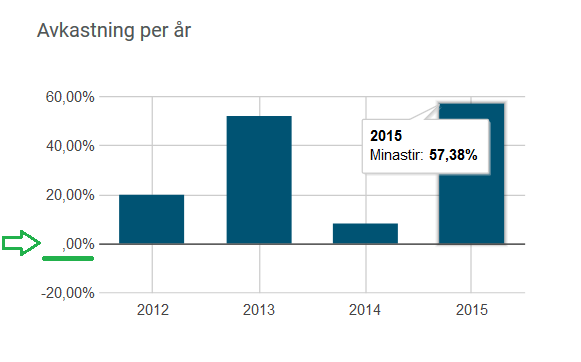
I encountered an issue when choosing the data format "99.9%, "99.99%", "99,999.9" and "99,999.99". When choosing these formats, the initial "0" is missing in the y-axis, please see the attached picture.
If possible, i would also like to request that "unnecessary" decimals on the y-axis to be excluded. For example, if the value on the y-axis is more than 2 numbers, e.g. XX, then don't add decimals. But if the value is less than 1 number, then add 1 decimal. So 20.00 would be simply "20", and 2.00 would be "2.0" Or perhaps an option to chose to exclude decimals on the y-axis.
Thank you very much for your consideration!
I downloaded and installed the new version of vChart and it works just as it does on the live website, thank you very much!
I encountered an issue when choosing the data format "99.9%, "99.99%", "99,999.9" and "99,999.99". When choosing these formats, the initial "0" is missing in the y-axis, please see the attached picture.
If possible, i would also like to request that "unnecessary" decimals on the y-axis to be excluded. For example, if the value on the y-axis is more than 2 numbers, e.g. XX, then don't add decimals. But if the value is less than 1 number, then add 1 decimal. So 20.00 would be simply "20", and 2.00 would be "2.0" Or perhaps an option to chose to exclude decimals on the y-axis.
Thank you very much for your consideration!
- Zaheer Abbas
- New Member
-
Less
More
28 Oct 2015 10:53 #1565
by Zaheer Abbas
Replied by Zaheer Abbas on topic Issues regarding chart formatting
Hi Xenon
Download latest package of vchart from your order section and install it.
thanks
zaheer
Download latest package of vchart from your order section and install it.
thanks
zaheer
Please Log in to join the conversation.
- Xenon
- Topic Author
- Offline
- New Member
-
Less
More
- Posts: 13
28 Oct 2015 09:53 #1563
by Xenon
Replied by Xenon on topic Issues regarding chart formatting
I noticed that there seem to have been made changes to the vChart installation files, so I copied the folders (administrator\components\com_vchart) and (components\com_vchart) from the live website to my localhost, but the chart om my localhost still looks different.
Could you advise me what I should do to make the charts on my localhost look the same as the live version website?
Thank you for your patience.
Could you advise me what I should do to make the charts on my localhost look the same as the live version website?
Thank you for your patience.
Please Log in to join the conversation.
- Xenon
- Topic Author
- Offline
- New Member
-
Less
More
- Posts: 13
28 Oct 2015 09:15 #1562
by Xenon
Replied by Xenon on topic Issues regarding chart formatting
Hi Zaheer,
Thank you for taking time to look at the issue.
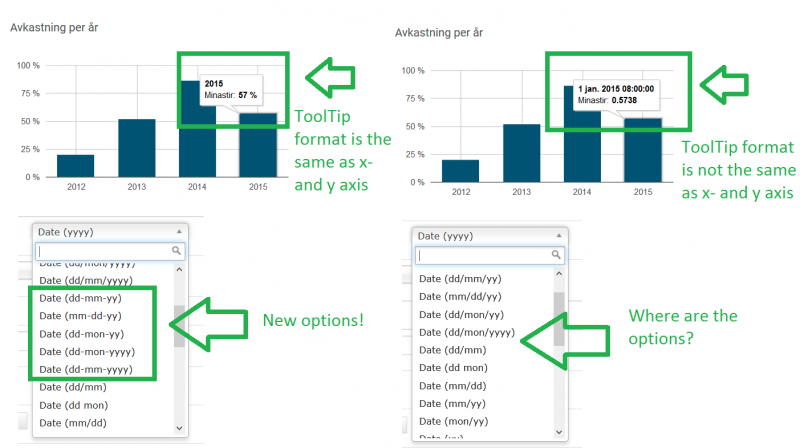
May I ask what changes you made to the bar chart (or vChart in general?) for the date and value in the tooltip box to be displayed in the same format as the same as the horizontal- and vertical values?
When I applied the exact same setting in the bar chart to my localhost website as you did to the live website, the chart is displayed differently. The live website also have new options which my localhost website doesn't.
Please see the attached picture.
Thank you for your help!
Thank you for taking time to look at the issue.
May I ask what changes you made to the bar chart (or vChart in general?) for the date and value in the tooltip box to be displayed in the same format as the same as the horizontal- and vertical values?
When I applied the exact same setting in the bar chart to my localhost website as you did to the live website, the chart is displayed differently. The live website also have new options which my localhost website doesn't.
Please see the attached picture.
Thank you for your help!
- Zaheer Abbas
- New Member
-
Less
More
27 Oct 2015 06:05 #1551
by Zaheer Abbas
Replied by Zaheer Abbas on topic Issues regarding chart formatting
Hi Xenon
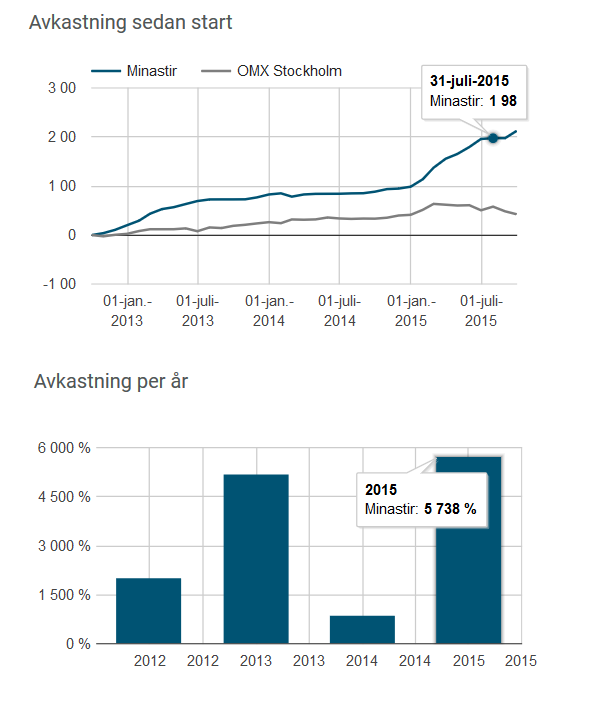
1. If you look at the line chart, the decimals are gone. The value for 2015-07-31 should be 197.55%, but it's displayed as "1 98".
Answer:In case of percent, google chart show round value.
2. If you look at the bar chart, there are too many horizontal values. There should be 4 values (2012, 2013, 2014, 2015), but now there are 8 values.
Answer: You can change number of label on horizontal line ,otherwise it will adjust according to the value for horizontal axis.Currently i have set 4 value in number of labels in horizontal axis in chart formatting section.
3. If you look at the bar chart, the value for 2015 should be 57.28%, but at the moment it's displayed as "5 738%"
Answer: If you want to show the value in percent, google chart api automatically multiply the value by 100, now I have change the value of Historical return - Per Year chart by dividing each value by 100.
we hope this response have sufficient answer of your query, if not than you can contact us, we will give the response as soon as possible.
thanks
zaheer
1. If you look at the line chart, the decimals are gone. The value for 2015-07-31 should be 197.55%, but it's displayed as "1 98".
Answer:In case of percent, google chart show round value.
2. If you look at the bar chart, there are too many horizontal values. There should be 4 values (2012, 2013, 2014, 2015), but now there are 8 values.
Answer: You can change number of label on horizontal line ,otherwise it will adjust according to the value for horizontal axis.Currently i have set 4 value in number of labels in horizontal axis in chart formatting section.
3. If you look at the bar chart, the value for 2015 should be 57.28%, but at the moment it's displayed as "5 738%"
Answer: If you want to show the value in percent, google chart api automatically multiply the value by 100, now I have change the value of Historical return - Per Year chart by dividing each value by 100.
we hope this response have sufficient answer of your query, if not than you can contact us, we will give the response as soon as possible.
thanks
zaheer
Please Log in to join the conversation.
- Xenon
- Topic Author
- Offline
- New Member
-
Less
More
- Posts: 13
26 Oct 2015 16:51 #1549
by Xenon
Replied by Xenon on topic Issues regarding chart formatting
1. If you look at the line chart, the decimals are gone. The value for 2015-07-31 should be 197.55%, but it's displayed as "1 98".
2. If you look at the bar chart, there are too many horizontal values. There should be 4 values (2012, 2013, 2014, 2015), but now there are 8 values.
3. If you look at the bar chart, the value for 2015 should be 57.28%, but at the moment it's displayed as "5 738%"
I would really appreciate if you could look at it again? Thank you for your help!
2. If you look at the bar chart, there are too many horizontal values. There should be 4 values (2012, 2013, 2014, 2015), but now there are 8 values.
3. If you look at the bar chart, the value for 2015 should be 57.28%, but at the moment it's displayed as "5 738%"
I would really appreciate if you could look at it again? Thank you for your help!
Please Log in to join the conversation.
- Xenon
- Topic Author
- Offline
- New Member
-
Less
More
- Posts: 13
26 Oct 2015 16:44 #1548
by Xenon
Replied by Xenon on topic Issues regarding chart formatting
Thank you very much for looking into the issue, I really appreciate it. However, when I look at it now (I haven't made any changes) it still looks strange.
Would you mind looking at it again?
- Daniel
- Offline
- Administrator
-
26 Oct 2015 15:26 #1547
by Daniel
Thanks
Daniel
Replied by Daniel on topic Issues regarding chart formatting
Hi,
All the issues are corrected. But if you will use % as suffix then it will convert all the values in percentage ( will multiply with hundred ). So take care of this.
Thanks
Daniel
Please Log in to join the conversation.
- Xenon
- Topic Author
- Offline
- New Member
-
Less
More
- Posts: 13
26 Oct 2015 07:03 #1544
by Xenon
Replied by Xenon on topic Issues regarding chart formatting
I just sent you a mail. Thank you for looking into it!
Please Log in to join the conversation.
- Zaheer Abbas
- New Member
-
Less
More
26 Oct 2015 04:34 #1543
by Zaheer Abbas
Replied by Zaheer Abbas on topic Issues regarding chart formatting
Hi Xenon
Please send your backhand detail at support@wdmtech.com, so that we can check it.
thanks
zaheer
Please send your backhand detail at support@wdmtech.com, so that we can check it.
thanks
zaheer
Please Log in to join the conversation.
- Xenon
- Topic Author
- Offline
- New Member
-
Less
More
- Posts: 13
22 Oct 2015 10:11 #1522
by Xenon
Replied by Xenon on topic Issues regarding chart formatting
Hi Danish, I will await your reply, thank you very much!
Please Log in to join the conversation.
- Daniel
- Offline
- Administrator
-
22 Oct 2015 05:55 #1521
by Daniel
Thanks
Daniel
Replied by Daniel on topic Issues regarding chart formatting
We are looking into it. Please allow us sometime, Will get back to you soon....
Thanks
Daniel
Please Log in to join the conversation.
- Xenon
- Topic Author
- Offline
- New Member
-
Less
More
- Posts: 13
21 Oct 2015 16:44 #1518
by Xenon
Replied by Xenon on topic Issues regarding chart formatting
Another question:
5. I tried to work around question 2 by changing the bar value from 0.5738 to 57.38 and then add "%" in the "Add String Before and after Vertical Value", but then the value in the vertical axis suddenly became percent values (0%, 1500%, 3000%) instead of the value that I expected (0%, 15%, 30%). If I changed the "%" to "p" then the number displayed correctly (0p, 15p, 30p).
Basically, I just want the vertical axis to display 0%, 15%, 30%, etc. and the value when hovering the bar to display 57.38%.
Please help?
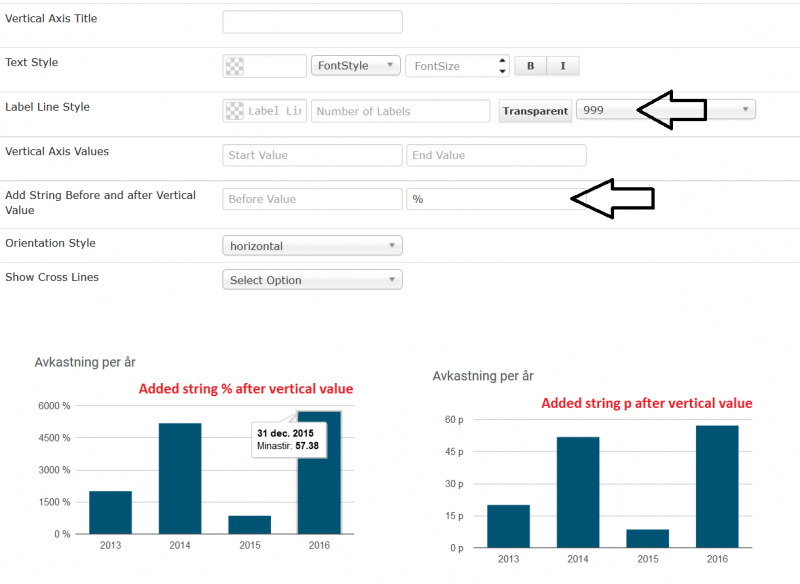
5. I tried to work around question 2 by changing the bar value from 0.5738 to 57.38 and then add "%" in the "Add String Before and after Vertical Value", but then the value in the vertical axis suddenly became percent values (0%, 1500%, 3000%) instead of the value that I expected (0%, 15%, 30%). If I changed the "%" to "p" then the number displayed correctly (0p, 15p, 30p).
Basically, I just want the vertical axis to display 0%, 15%, 30%, etc. and the value when hovering the bar to display 57.38%.
Please help?
- Xenon
- Topic Author
- Offline
- New Member
-
Less
More
- Posts: 13
21 Oct 2015 16:24 #1517
by Xenon
Replied by Xenon on topic Issues regarding chart formatting
Hi again,
I think I managed to solve the date issue by changing the date input format to yyyy/mm/dd. But now I have some other problems.
1. If I put the date as 2015/12/31, hovering the bar displays the date as 31 dec-2015, but the horizontal axis displays it as 01-jan.-2016. Please see the attached picture where I tried two output styles, (dd/mon/yyyy) and (yyyy).
2. How do I format the values displayed when hovering a bar? In the attached picture, you can see the value for the bar 2015 (or 2016...) as 0.5738. I want this to be displayed as 57.28% just like the vertical axis which is 0%, 15%, 30%, etc.
3. How do I customize the style for the date to, for example, yyyy-mm-dd?
4. Adding vertical lines when the horizontal value is a date value works well, but it doesn't work when it is a string. Please help?
Thank you very much for your help.
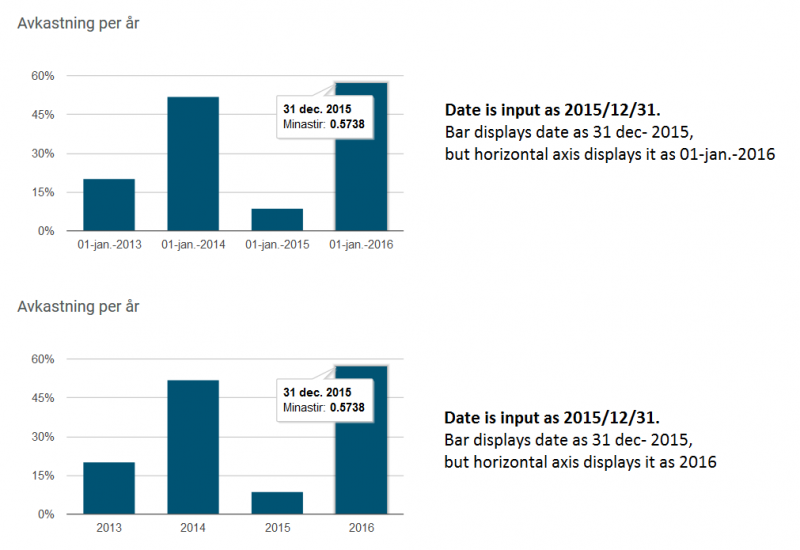
I think I managed to solve the date issue by changing the date input format to yyyy/mm/dd. But now I have some other problems.
1. If I put the date as 2015/12/31, hovering the bar displays the date as 31 dec-2015, but the horizontal axis displays it as 01-jan.-2016. Please see the attached picture where I tried two output styles, (dd/mon/yyyy) and (yyyy).
2. How do I format the values displayed when hovering a bar? In the attached picture, you can see the value for the bar 2015 (or 2016...) as 0.5738. I want this to be displayed as 57.28% just like the vertical axis which is 0%, 15%, 30%, etc.
3. How do I customize the style for the date to, for example, yyyy-mm-dd?
4. Adding vertical lines when the horizontal value is a date value works well, but it doesn't work when it is a string. Please help?
Thank you very much for your help.
- Xenon
- Topic Author
- Offline
- New Member
-
Less
More
- Posts: 13
21 Oct 2015 15:47 #1516
by Xenon
Replied by Xenon on topic Issues regarding chart formatting
Hi Zaheer,
Thank you very much for your fast reply, I really appreciate it.
I still have an issue with question 2 regarding the vertical lines. Currently, I have the dates formatted as "string" in the "Horizontal value" format, but in the "Label Line Style" for Horizontal Axis, there is no "string" option for "Data type", only Decimal-, Scientific-, Currency-, etc.
When I choose "10" for "Number of labels", there is no change in the chart at all, regardless of what choice I make in "Data Type" (Decimal-, Scientific-, Currency-, etc.).
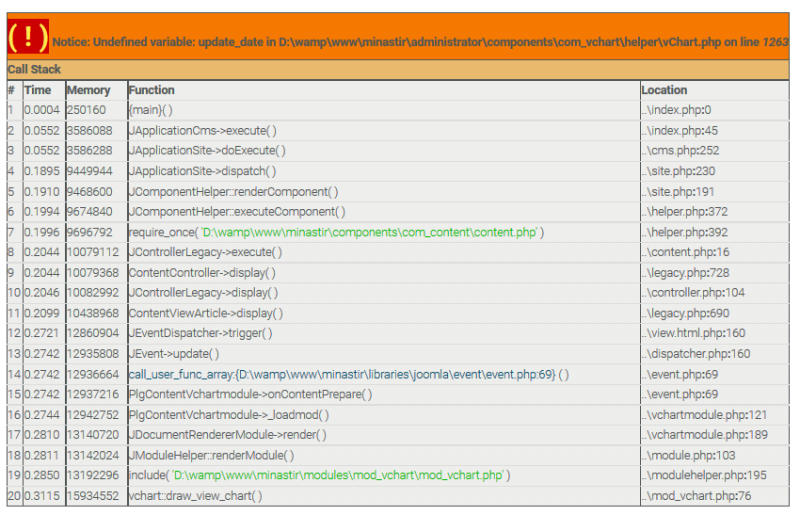
When I change the "Horizontal value format" from string to "Date", then I get lots of problems, see the attachment. I suspect this is because I have the wrong date format?
Currently, my dates are arranged as 2015-10-01, 2015-10-02, 2015-10-03, etc. How should the dates be formatted in order to work?
When I chose Horizontal value format as "date", in the "Label line style" I get to chose how to display the dates, e.g. mm/dd/yy, dd/mm/yy, dd/mon/yyyy, etc. How do I change this to yyyy-mm-dd, or how can I customize it?
Thank you once again for your time and help.
Thank you very much for your fast reply, I really appreciate it.
I still have an issue with question 2 regarding the vertical lines. Currently, I have the dates formatted as "string" in the "Horizontal value" format, but in the "Label Line Style" for Horizontal Axis, there is no "string" option for "Data type", only Decimal-, Scientific-, Currency-, etc.
When I choose "10" for "Number of labels", there is no change in the chart at all, regardless of what choice I make in "Data Type" (Decimal-, Scientific-, Currency-, etc.).
When I change the "Horizontal value format" from string to "Date", then I get lots of problems, see the attachment. I suspect this is because I have the wrong date format?
Currently, my dates are arranged as 2015-10-01, 2015-10-02, 2015-10-03, etc. How should the dates be formatted in order to work?
When I chose Horizontal value format as "date", in the "Label line style" I get to chose how to display the dates, e.g. mm/dd/yy, dd/mm/yy, dd/mon/yyyy, etc. How do I change this to yyyy-mm-dd, or how can I customize it?
Thank you once again for your time and help.
Copyright © 2025 WDMtech | All Rights Reserved