
Importing Realty Data with Images in another table
- Daniel
- Offline
- Administrator
-

25 Apr 2019 10:58 #6858
by Daniel
Thanks
Daniel
Replied by Daniel on topic Importing Realty Data with Images in another table
Hello,
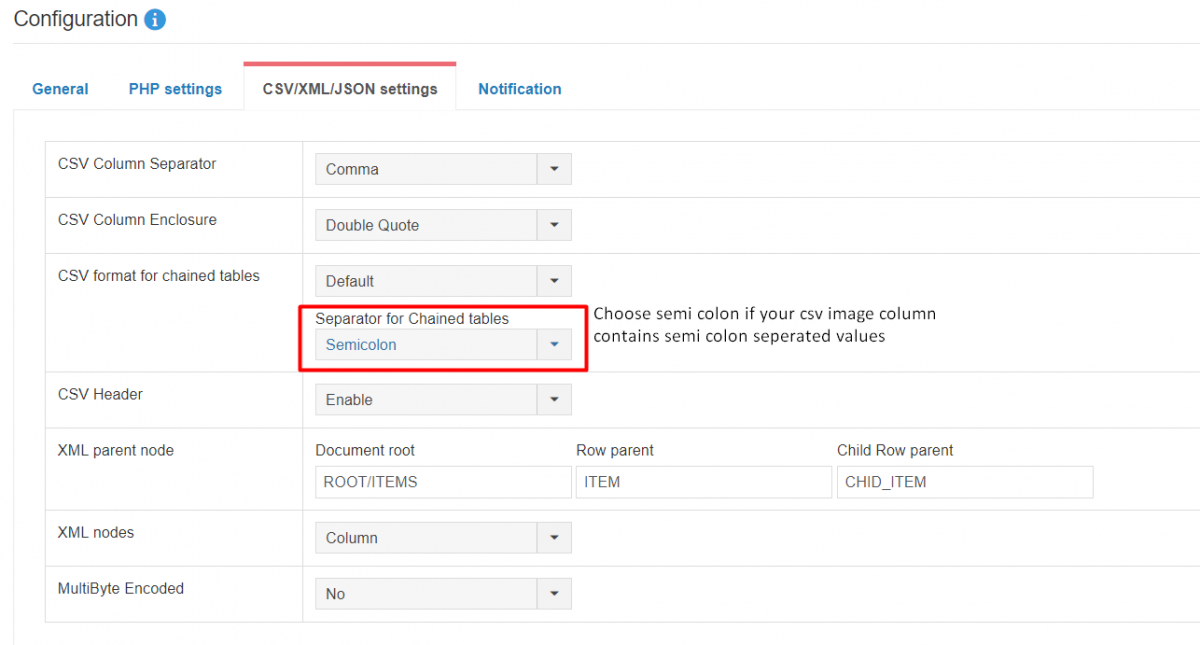
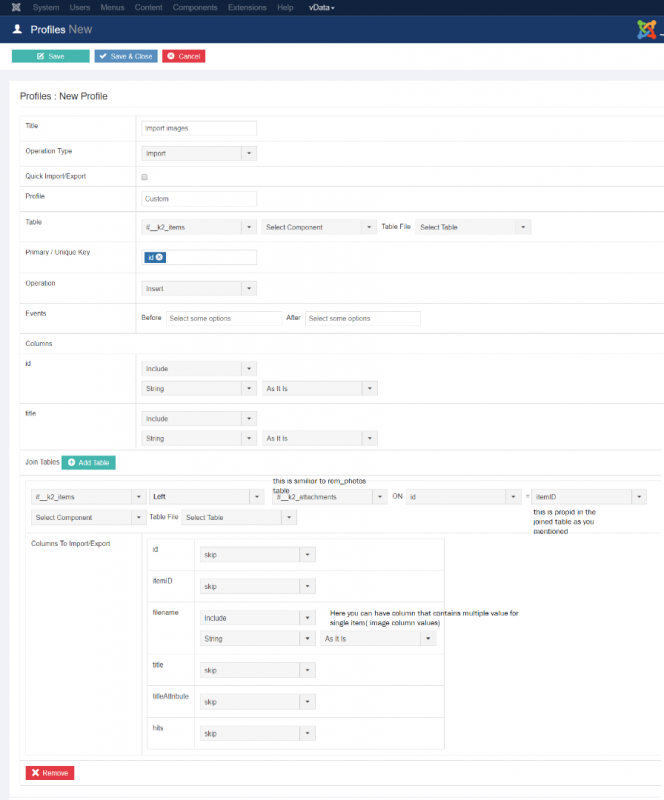
Please check the attached screenshots on How to import values in a joined table.
Please check the attached screenshots on How to import values in a joined table.
Thanks
Daniel
Please Log in to join the conversation.
- Charles Trig
- Topic Author
- Offline
- New Member
-

Less
More
- Posts: 5
25 Apr 2019 02:17 #6851
by Charles Trig
Importing Realty Data with Images in another table was created by Charles Trig
Hi everyone! I've been using vData for awhile now and have a new client that needs a csv import procedure to update their Joomla component for real estate rentals.
I have a CSV with all the columns matched / named for all the database columns (rem_houses), and would like to JOIN another table (rem_photos) from a column in the CSV called 'images' - but the column has multiple image names, separated by semicolons. I would like to import this data into individual rows of the rem_photos table, each one inserting the column 'propid' with the associated propid for that record.
source data (CSV):
houseid images
2162 images/Abenaki/Abenaki.01.jpg;images/Abenaki/Abenaki.02.jpg;images/Abenaki/Abenaki.03.jpg;
Destination data (Database):
houseid img
2162 images/Abenaki/Abenaki.01.jpg
2162 images/Abenaki/Abenaki.02
2162 Abenaki/Abenaki.03.jpg
Can this be done? I read the import documentation carefully, but could not figure out how to JOIN and segregate the data without errors.
Thanks in advance!
I have a CSV with all the columns matched / named for all the database columns (rem_houses), and would like to JOIN another table (rem_photos) from a column in the CSV called 'images' - but the column has multiple image names, separated by semicolons. I would like to import this data into individual rows of the rem_photos table, each one inserting the column 'propid' with the associated propid for that record.
source data (CSV):
houseid images
2162 images/Abenaki/Abenaki.01.jpg;images/Abenaki/Abenaki.02.jpg;images/Abenaki/Abenaki.03.jpg;
Destination data (Database):
houseid img
2162 images/Abenaki/Abenaki.01.jpg
2162 images/Abenaki/Abenaki.02
2162 Abenaki/Abenaki.03.jpg
Can this be done? I read the import documentation carefully, but could not figure out how to JOIN and segregate the data without errors.
Thanks in advance!
Please Log in to join the conversation.